Viggle AI Review 2026: The Viral Tool That Raises Serious Privacy Questions

Rajat Chauhan
The Bottom Line: Viggle AI is arguably the best tool for creating viral memes in 2025. It is fast, free, and incredibly funny. But it comes at a hidden cost: Your Privacy.
QUICK VERDICT: THE SAFETY SCORECARD
| Feature | Rating | The Reality |
|---|---|---|
| Viral Potential | ⭐⭐⭐⭐⭐ | Instant TikTok/Reels engagement. |
| Ease of Use | ⭐⭐⭐⭐⭐ | My 60-year-old mother figured it out in 2 minutes. |
| Video Quality | ⭐⭐⭐⭐ | Surprisingly good physics (no "noodle arms"). |
| Privacy/Safety | ⭐ | Warning: Uploaded data is used for AI training indefinitely. |
| Cost | Free | Generous free tier; Pro is optional. |
The "Viral" Discovery
I discovered Viggle AI the way most people do: through a TikTok showing someone dancing as their favorite movie character. The video had millions of views. The comments were full of people asking, "How did you do that?"
The answer was Viggle.
I decided to dig into it—really dig into it—because its rise from obscurity to 40+ million users in months felt worth understanding.
What I found was a powerful, genuinely impressive tool. But I also found something else: serious questions about what happens to the photos you upload. Questions that most YouTube tutorials completely ignore.
What Is Viggle AI?
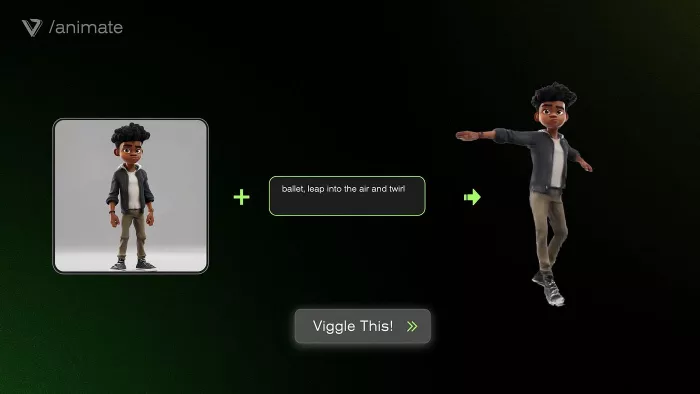
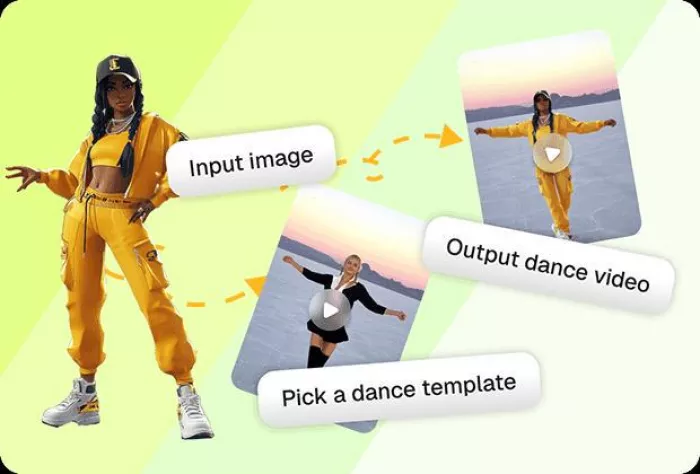
Viggle is a motion capture and animation platform that turns static images into dynamic videos.
It uses the JST-1 video-3D foundation model, which understands real-world physics. That means when a character's arm swings, it swings naturally. It isn't the "rubber-puppet" effect you get from cheaper deepfake tools.
Why It Exploded:
- Zero Skill Required: You upload a photo, pick a dance, and click "Generate."
- Trend-Jacking: The template library is updated daily with TikTok trends.
- Discord Roots: It has one of the largest Discord communities on Earth (4M+ members).
The Good Stuff (Why People Love It)
Before we get to the warnings, let's be honest: The tool works.
- Ease of Use: There is no learning curve. It works on mobile, browsers, and Discord.
- Speed: From upload to viral video takes about 5 minutes.
- Direct Sharing: You can post directly to social platforms without complex exporting.
If your only goal is to make a funny video for a group chat, Viggle is a 10/10.
The Privacy Problem (Read This Before Signing Up)
This is the part most reviews skip. And it is the part that actually matters.
When you upload an image to Viggle, the platform retains it. Not temporarily. Indefinitely.
“The Data Reality According to user reports and analysis of the Terms of Service:”
- Model Training: Your face and likeness are used to train their AI models.
- Zombie Data: Even if you delete your account, your data may persist in the "training set" that powers the AI for everyone else.
- Third-Party Sharing: Data is shared with advertising and analytics partners.
What This Means for You: If you upload a photo of yourself, you are technically consenting to your likeness becoming part of Viggle's permanent brain. For a meme of a celebrity? Maybe you don't care. For a photo of your child or yourself? You should pause.
Who Should Actually Use Viggle?
The honest answer depends on what you value more: Clout or Control.
Use Viggle if:
- You are a TikTok/Reels creator chasing trends.
- You want to make memes using public figures or fictional characters.
- You are okay with the "freemium" trade-off (Free tools = You are the product).
DELETE Viggle if:
- You are privacy-conscious.
- You are working in a regulated industry (Gov, Legal, Health).
- You are uncomfortable with your face being used to train an AI company's algorithm.
FAQ: The Questions You Are Too Afraid to Ask
Q: Is Viggle AI safe from malware?
A: Yes. The site and Discord are technically safe from viruses.
Q: Is Viggle AI safe for privacy?
A: No. The data retention policies are aggressive. Assume anything you upload is public forever.
Q: Can I really make viral videos with it?
A: Yes. The "uncanny valley" humor of Viggle videos is currently very popular on social algorithms.
Q: What happens if I delete my photos?
A: They are removed from your gallery, but they likely remain in the backend database used for training.
Final Verdict
Viggle AI deserves its popularity. It genuinely makes high-end animation accessible to memesters.
But popularity doesn't equal safety.
- For Memes? Go for it.
- For Personal Photos? Keep them on your phone.
Your convenience for your data. That is the trade. Make sure it is one you are comfortable making.
Disclaimer: This review is based on independent research into Viggle's Terms of Service and user reports. We have no affiliation with Viggle AI.
Comparison: DeepAI vs. Viggle AI
Many creators ask us which tool is better. The answer depends on what you are building:
Use DeepAI if: You need static assets for a business or project. If you want to generate a logo, a blog header, or a royalty-free image that you own 100% of, DeepAI is the professional choice. It is safer for privacy and better for copyright.
Read our full DeepAI Review here.
Use Viggle AI if: You need viral motion for social media. If you want to take a static character and make them dance to a trending TikTok audio, Viggle is the only tool that handles that specific physics. Just be aware of the data privacy trade-offs.
The Rule of Thumb: DeepAI is for the Studio; Viggle is for the Feed.

Comments