Unbanned G+: The Free Gaming Trend Schools Can't Block

Rajat Chauhan
Table of Contents
- What Is Unbanned G+ in Simple Terms?
- How These Game Hubs Actually Work
- Why People Use Unbanned G+ Sites
- Popular Games You Will Find
- Is Unbanned G+ Safe? An Honest Assessment
- A Guide for Parents and Teachers
- Unbanned G+ Compared to Other Platforms
- How to Spot Fake or Unsafe Sites
- Frequently Asked Questions
- Key Takeaways
I first heard "Unbanned G+" from a colleague whose teenager kept mentioning it. Nobody in the room knew whether it was an app, a website, or something that would get a Chromebook confiscated. I spent an evening testing links and digging into the concept. What I found was both simpler and more complicated than expected.
This guide covers everything I wish existed when I started that search, written for students, parents, teachers, and anyone else who has encountered the term and wants a straight answer.
What Is Unbanned G+ in Simple Terms?
Unbanned G+ is not a single website, not an app, and not a Google product. It is an informal label students and casual gamers use for a loose collection of browser-based game hubs that remain accessible on school and workplace networks where mainstream gaming sites are blocked.
The "G+" causes confusion, but it has nothing to do with the defunct Google+ social network. The label emerged from student shorthand, likely because many hubs are hosted on Google Sites and "plus" signals "extra" rather than any official branding. There is no formal organization, trademark, or company behind the term.
Think of it like "Googling" for searching. It points to a category of sites, not one destination.
Common spelling variants all refer to the same concept: Unbanned G+, Unbanned G, Unbanned G Plus, Unblocked Games G+, and Unbanned Games G+. Students hear the term spoken aloud, so spellings vary widely.
How These Game Hubs Actually Work
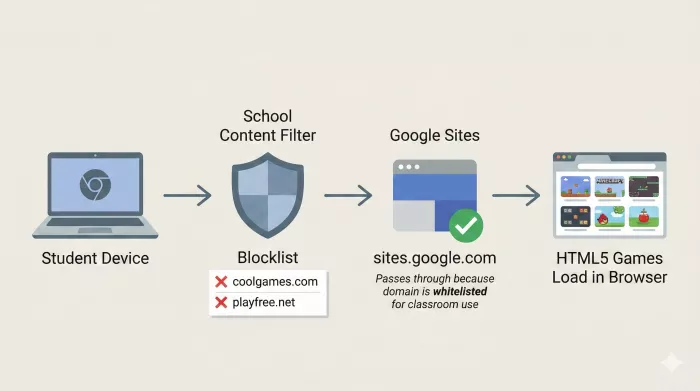
Most schools and offices use content filters that maintain blocklists of known gaming domains. Unbanned G+ hubs sidestep this through three mechanisms:
Trusted hosting platforms. Many hubs live on Google Sites (sites.google.com). Schools rely on Google Workspace for Education, so blocking the entire domain would also block legitimate classroom resources. This makes it impractical for IT administrators to block without collateral damage.
HTML5 browser-based games. Games run entirely in the browser. No downloads, no plugins, no executable files. Click a thumbnail, play in your tab, close when done.
Mirror sites and domain agility. When one URL gets blocked, operators spin up a new page at a different address. This cat-and-mouse dynamic is why you see names like "Drive U 7" or "Classroom Center G+" rather than a single stable brand.
What You Actually See on These Sites
I have visited several hubs across different browsers and devices. A typical one features a simple homepage with a colorful banner, followed by a grid of game thumbnails organized by genre: Action, Puzzle, Racing, Multiplayer, sometimes Educational. Clicking a thumbnail loads the game directly in the browser. Navigation is minimal, and there is rarely a meaningful about page or privacy policy.
The feel is functional but bare-bones. These are quick-access portals, not polished commercial platforms.
Why People Use Unbanned G+ Sites
Students on restricted networks are the primary audience. School-issued Chromebooks are locked down with managed profiles, restricted installations, and aggressive filtering. For a student with ten minutes between classes, finding a game that actually loads is the entire goal. These hubs deliver that with zero friction.
Office workers are a secondary audience. Corporate firewalls block gaming sites for similar reasons, and some adults look for quick browser games during lunch. No installs, no admin rights, closes without a trace.
Unbanned G+ exists because there is a persistent gap between what network administrators restrict and what users want during free time. As long as that gap exists, sites like these will appear.
Popular Games You Will Find
Based on my browsing across several active hubs, these titles show up most consistently:
- Moto X3M — Side-scrolling motorcycle racing with obstacle courses. Short, satisfying levels.
- 1v1.lol — Browser-based multiplayer building and shooting, often compared to simplified Fortnite.
- Geometry Dash — Rhythm-based platformer with obstacle courses synced to music.
- Slope — 3D ball-rolling game on an endless downhill course. Runs on almost any hardware.
- Run 3 — Endless runner in space tunnels with progressively harder levels.
- Retro Bowl — Simplified American football sim that became massively popular among students.
- Educational games — Some hubs include math puzzles, typing games, and logic challenges, partly to support "classroom-safe" positioning and partly because teachers use these as reward activities.
The core library revolves around lightweight HTML5 titles that load fast, play with keyboard or touchscreen, and require no account.
Is Unbanned G+ Safe? An Honest Assessment
This question deserves a layered answer rather than blanket reassurance.
Device security. Hubs on Google Sites benefit from HTTPS encryption and Google's malware scanning. This provides a baseline, though it is not bulletproof. The real risk comes from lesser-known clones. I have encountered pages claiming to be Unbanned G+ that triggered pop-ups, attempted redirects, or displayed fake "your device is infected" warnings. If a site opens unexpected windows or asks you to download anything, close it immediately.
Content appropriateness. Most games on established hubs are casual and cartoony. I did not find explicitly inappropriate games on major hubs. However, curation is inconsistent, and no one rates these games the way the ESRB rates console titles. Some hubs display third-party ads that are not designed with a student audience in mind.
Data privacy. Most hubs do not ask for personal information, which is a point in their favor. But any website can use cookies, analytics, and ad trackers. The hubs I examined lacked visible privacy policies. My recommendation: never enter personal information on these sites.
Policy compliance. Using these sites is not illegal. Playing browser games is not hacking. However, most schools have Acceptable Use Policies restricting non-educational internet use during instruction. If your school's AUP prohibits gaming during class, playing Moto X3M during math violates that policy regardless of whether the site loads. The same logic applies to workplace IT policies.
The technology is neutral. The rules you agreed to follow determine whether using these sites is appropriate.
A Guide for Parents and Teachers
These sites host simple browser games on platforms like Google Sites. They do not install software or modify device settings. They simply exist on domains that are not yet blocklisted.
Should you be concerned? If your worry is malware, the risk from established Google Sites hubs is relatively low. If your worry is distraction during learning, that is more legitimate and pressing. If your worry is inappropriate content, games tend to be benign but ads can be unpredictable.
What you can do:
- Talk about it rather than just blocking it. Students who lose one hub find another within a day. A conversation about safe browsing and appropriate timing serves better than a blocklist arms race.
- Review the specific sites yourself. Spend five minutes on the hub your student has bookmarked and judge based on what you see.
- Set clear expectations. "Browser games during free time, not during instruction" is a rule students can understand and follow.
- For IT administrators: Blocking individual Google Sites URLs is more sustainable than blocking the entire domain. Some filtering solutions allow category-based rules targeting gaming keywords without affecting educational pages.
Unbanned G+ Compared to Other Platforms
| Factor | Unbanned G+ | UBG66 | Classroom 6x | Generic Portals |
|---|---|---|---|---|
| What it is | Informal label for multiple hubs | Single branded platform | School-focused brand | Various independent sites |
| Hosting | Often Google Sites | Google Sites | Various domains | Standalone domains |
| Game library | Varies by hub | 500+ titles | Large, updated | Varies widely |
| Mobile support | Depends on hub | Generally good | Mixed | Mixed |
| Safety transparency | Minimal | Some content notes | Moderate | Often minimal |
| Ad intrusiveness | Varies | Moderate | Moderate | Often heavy |
| Stability | Low | Moderate | Moderate | Low to moderate |
If reliability matters most, a branded platform like UBG66 tends to be more consistent. For school-oriented framing, Classroom 6x leans into that positioning. The Unbanned G+ approach of trying multiple mirrors is the most resilient but carries the highest risk of landing on a low-quality clone.
How to Spot Fake or Unsafe Sites
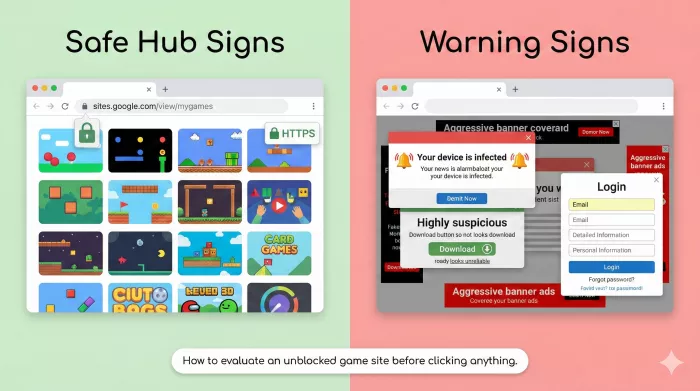
Green flags: Hosted on Google Sites, uses HTTPS, games load without download prompts, clean layout, minimal ads.
Red flags: Unfamiliar domain with random characters, immediate pop-ups or redirects, fake security warnings, download or extension requests, login forms asking for personal information, aggressive advertising.
When in doubt, close the tab. No browser game is worth compromising your device.
Frequently Asked Questions
What exactly is Unbanned G+?
A colloquial term for browser-based game hubs accessible on restricted networks. Not an official product or company.
Is it connected to Google or Google+?
No. Some hubs use Google Sites for hosting, but there is no affiliation with Google.
Is it legal?
Visiting these sites is not illegal, but it may violate school or workplace acceptable use policies.
Can these sites give my device a virus?
Established Google Sites hubs carry low malware risk. Unknown clones can be dangerous. Never download anything from these sites.
Do they track my activity?
They may use standard web tracking like cookies and analytics. Never enter personal information.
Do I need an account or downloads?
No. Games run directly in the browser. If a site asks for sign-ups or downloads, it is likely not legitimate.
Why do URLs keep changing?
When administrators block a specific URL, operators create new pages at different addresses.
Can I use it on mobile?
Many HTML5 games work on mobile browsers, though some are designed for keyboard controls. UBG66 focuses specifically on mobile optimization.
What should I do if my school blocks these sites?
Respect the restriction. If you believe access should be allowed during free time, raise the issue through appropriate channels.
What should parents do if they find these sites?
Start with a conversation. Review the specific sites, set expectations about timing, and focus on time management rather than attempting to block every possible URL.
Key Takeaways
Unbanned G+ is a phenomenon, not a product. It reflects what happens when networks block entertainment and users find alternative paths. Understanding the concept matters more than chasing individual URLs that will change next week.
The safety considerations are real but manageable: stick to known hubs, avoid downloads, never share personal information, and respect the rules of whatever institution owns the network you are using.
For students, it is convenient downtime entertainment. For parents and teachers, it is a manageable part of the digital landscape. For IT administrators, it is a low-severity challenge best addressed through clear policies rather than endless blocklist updates.
I have tried to present the honest picture based on what I have personally tested. The landscape will keep evolving, but the underlying dynamics are here to stay.

Comments