Sitemap Generator UploadArticle.com: Full Review (2026)

Rajat Chauhan
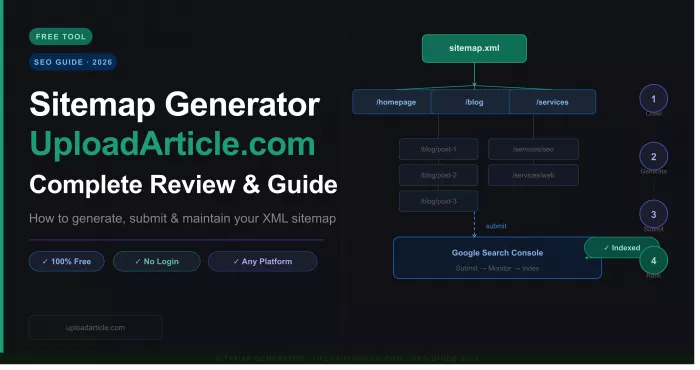
A sitemap tells search engines which pages exist on a website and which ones matter. Without one, Google discovers content by following links, a process that can miss orphan pages, skip deep content, and take days or weeks to catch new posts. The Sitemap Generator on UploadArticle.com offers a shortcut: paste a URL, wait for a crawl, and download a ready-to-submit XML sitemap file. No account, no plugin, no payment. This review covers how the tool works in August 2026, what the output actually looks like, where it falls short, and which alternatives fit better when the workflow outgrows a manual generator.
What Is the Sitemap Generator on UploadArticle.com?
It is a free, browser-based utility that crawls a website from a starting URL and compiles the discovered pages into a standard XML sitemap file. The output follows the sitemaps.org protocol, which Google, Bing, and Yandex all parse during indexing. There is no software to install, no account to create, and no paywall.
The tool is designed for a specific scenario: someone who needs a working sitemap for a small or static site without touching code, installing plugins, or paying for a subscription. It does that job and nothing more.
| Attribute | Details |
|---|---|
| Type | Browser-based XML sitemap generator |
| Price | Free, no paid tiers |
| Account required | No |
| Installation | None |
| Output | XML sitemap (sitemaps.org compliant) |
| Automation | None, manual regeneration only |
| Submission | Manual (user uploads file and submits to GSC) |
| Best for | Small static sites, one-off jobs, freelancer handoffs |
How to Use It: Step-by-Step Workflow
The process takes under 10 minutes for a site with fewer than 500 pages.
Step 1: Open the tool and paste the URL. Navigate to the Sitemap Generator page on UploadArticle.com. Enter the full canonical homepage URL, making sure the protocol (https) and subdomain (www or non-www) match the live version of the site.
Step 2: Adjust settings if available. The interface may expose options to exclude specific URL patterns (login pages, search results, tag archives) or adjust change frequency and priority hints. For small sites, leaving defaults is fine.
Step 3: Generate and wait. Click the generate button. Sites under 100 pages finish in seconds. Sites with several hundred pages take one to five minutes. The tool crawls one URL at a time rather than parallelizing, so larger sites scale linearly.
Step 4: Download the sitemap.xml file. Once the crawl completes, download the output file. Before uploading, open the file in a text editor or browser and scan the URLs. Verify that the count roughly matches the number of pages on the site and that no unexpected URLs (404 pages, redirects, admin screens) appear in the list.
Step 5: Upload to the site root. Place the file in the website's root directory via FTP, hosting control panel, or deployment pipeline so it is accessible at yourdomain.com/sitemap.xml.
Step 6: Submit to Google Search Console. Log into Google Search Console, navigate to the Sitemaps section, enter sitemap.xml, and submit. Repeat in Bing Webmaster Tools for Bing coverage. Also add a Sitemap line to robots.txt:
Sitemap: https://www.yourdomain.com/sitemap.xml
This ensures crawlers from search engines where you have not manually submitted can still locate the file.
What the Output Includes (and What It Misses)
The generated file contains a root urlset element with individual url entries, each including a loc tag (the page URL) and optional lastmod, changefreq, and priority hints. This structure is standard and uploads to Google Search Console without conversion.
What the output does not include:
No sitemap index splitting for sites above the 50,000-URL protocol limit. No error log showing which URLs were skipped due to redirects, 404s, or robots.txt blocks. No scheduled regeneration. No automatic ping to search consoles after the file is updated. No dedicated image or video sitemap entries. Each of these is standard in more advanced tools and absent here.
Validation step most guides skip: After downloading, validate the sitemap by opening it in a browser (Chrome renders XML natively) or running it through a free XML validator. Common issues include mixed-protocol URLs (http pages listed in an https sitemap), trailing slashes inconsistencies, and URLs that return 301 redirects. Submitting a sitemap with these issues sends conflicting signals to crawlers and can delay indexing rather than accelerate it.
Honest Limitations
JavaScript-heavy sites produce incomplete sitemaps. The crawler follows standard HTML anchor links. Pages rendered entirely through JavaScript (React, Vue, Angular SPAs without server-side rendering) may not appear in the output. This is a limitation of all lightweight browser-based crawlers, not just this one.
The sitemap goes stale immediately. A one-time file reflects the site at the moment of generation. Every new page, deleted page, or URL change after that moment makes the file outdated. Active blogs need weekly regeneration at minimum. Ecommerce catalogs with daily changes need automation this tool does not provide.
No documented URL ceiling. Competing tools like XML-Sitemaps.com cap free crawls at 500 URLs and Screaming Frog enforces the same limit on its free version. UploadArticle.com publishes no such number, which sounds generous until a mid-sized site discovers the actual cap by running into it. Documented limits are a feature, not a constraint, because they set expectations before a crawl starts.
The host site carries weak trust signals. A free tool inherits the credibility of its host. UploadArticle.com mixes SEO tooling content with unrelated verticals (including casino-adjacent content), which dilutes topical authority. Social media links on the site have historically reloaded the page rather than opening external profiles. The contact page has improved (a July 2026 check confirmed it resolves with contact information), but the overall editorial scope remains unfocused. The sitemap output is technically unaffected by these issues, but users evaluating tools for professional workflows should factor host credibility into their decision.
How It Compares to Alternatives
| Tool | Price | URL limit | Setup | Auto-update | Best for |
|---|---|---|---|---|---|
| UploadArticle.com | Free | Undocumented | Browser | No | One-off sitemaps, small static sites |
| XML-Sitemaps.com | Free / ~$3/mo paid | 500 free | Browser | No (paid tier adds scheduling) | Small sites with a documented limit |
| Yoast SEO | Free / $119/yr premium | Unlimited in WP | WordPress plugin | Yes | WordPress sites needing auto-updates |
| Rank Math | Free / $69/yr pro | Unlimited in WP | WordPress plugin | Yes | WordPress sites wanting lightweight plugin |
| Screaming Frog | Free / $279/yr | 500 free, unlimited paid | Desktop install | No (exports only) | SEO audits, agencies, large sites |
| Sitebulb | From $13.50/mo | Up to 10M URLs | Desktop or cloud | No | Deep crawl audits on large sites |
The decision framework:
If the site runs on WordPress, Yoast or Rank Math auto-regenerate sitemaps on every publish and require no manual intervention. This is almost always the better long-term answer for CMS-based sites.
If the site is static HTML, a headless CMS, or a custom build where a plugin is not an option, a browser-based generator like UploadArticle.com or XML-Sitemaps.com fills the gap. XML-Sitemaps.com has a longer track record and a documented URL ceiling, which makes it the more predictable choice.
If the workflow involves audits, broken link detection, or crawls above 500 pages, Screaming Frog or Sitebulb offer capabilities that no browser-based tool can match.
What to Do After Submitting the Sitemap
Submitting the file is half the job. Monitoring the results in Google Search Console completes the loop.
Check the Coverage report. Within a few days of submission, GSC will show how many URLs from the sitemap were discovered, how many were indexed, and how many were excluded. Common exclusion reasons include "Crawled, currently not indexed," "Duplicate without user-selected canonical," and "Blocked by robots.txt."
Watch for errors. GSC flags sitemap-specific issues like URLs that return 404, URLs blocked by robots.txt that are listed in the sitemap, and sitemap format errors. Fixing these and resubmitting improves crawl efficiency.
Monitor indexing velocity. For new sites, compare the date of sitemap submission against the date pages first appear in search results. A well-structured sitemap on a technically clean site should show initial indexing within one to two weeks. If pages remain unindexed after 30 days, the issue is content quality or technical problems, not the sitemap.
Who Should Use This Tool
Good fit: Bloggers, small business owners, and freelancers who need a working sitemap in five minutes without installing anything. Developers on static site generators or custom stacks where a CMS plugin is not an option. Agencies delivering a quick sitemap for a new client site during onboarding.
Poor fit: Sites with more than a few hundred pages. Sites that publish content daily or more frequently. JavaScript-heavy single-page applications. Anyone who needs automated regeneration, API access, or integration with a CI/CD pipeline.
The migration trigger: When manual regeneration becomes a recurring task rather than a one-off job, it is time to switch. For WordPress, that means installing Yoast or Rank Math. For custom builds, that means integrating sitemap generation into the deployment pipeline. For agencies, that means adopting Screaming Frog or Sitebulb as part of the audit toolkit.
Verdict
The Sitemap Generator on UploadArticle.com does one narrow thing well: it produces a valid XML sitemap from any public URL without plugins, signups, or code. For small static sites and one-off jobs, that is genuinely useful. The trade-off is everything it does not do: no automation, no error reporting, no documented URL limits, and no integration with anything.
The practical recommendation is straightforward. Use it for a quick, one-time sitemap when no better tool is already in place. Validate the output before submitting. Monitor the results in Google Search Console. And migrate to an automated solution the moment sitemap maintenance becomes a recurring line item in the workflow.
FAQ
Is the Sitemap Generator on UploadArticle.com free?
Yes. It is completely free with no paid tiers, no account requirement, and no usage quotas displayed during the workflow.
Does it require any technical skills?
No. The process involves pasting a URL, clicking a button, and downloading a file. The only mildly technical step is uploading the file to the site's root directory, which hosting control panels handle with a file manager interface.
Will it automatically update my sitemap when I publish new content?
No. The tool generates a one-time snapshot. Every new page or URL change after generation requires manually regenerating and resubmitting the file. For sites that publish regularly, a WordPress plugin like Yoast or Rank Math handles this automatically.
Can the generated sitemap hurt my SEO?
A sitemap itself does not hurt SEO, but submitting one with problems can waste crawl budget. Listing 404 pages, redirect chains, or noindexed URLs in a sitemap sends conflicting signals. Always review the file before submitting.
How does it compare to XML-Sitemaps.com?
Both are free, browser-based generators that produce standard XML output. XML-Sitemaps.com has a documented 500-URL free tier limit and a longer track record. UploadArticle.com publishes no URL ceiling, which introduces uncertainty for mid-sized sites. For sites under 500 pages, the choice comes down to personal preference.
What should I check in Google Search Console after submitting?
Monitor the Coverage report for indexed vs excluded URLs, check for sitemap-specific errors (404s, robots.txt conflicts), and track how quickly new pages appear in search results. If pages remain unindexed after 30 days, investigate content quality or technical issues rather than regenerating the sitemap.

Comments