IGsty.com Review 2026: Is It Safe & Legal? (The Honest Truth)

Rajat Chauhan
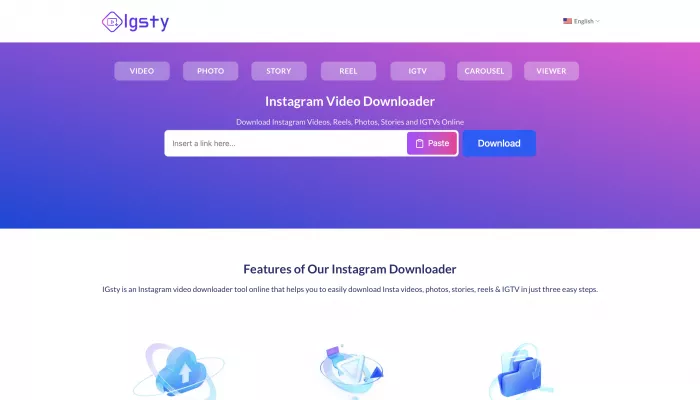
The Bottom Line: A fast, free tool that works well for personal archiving—but you need to know the rules.
Quick Verdict: The Scorecard
| Feature | Rating | The Reality |
|---|---|---|
| Speed | Fast | Downloads typically take 5-10 seconds. |
| Quality | HD | Saves media in original 1080p resolution (no compression). |
| Safety | Moderate | Safe from malware, but the site is aggressive with ads. |
| Anonymity | High | No login required. Instagram doesn't know it's you. |
| Legality | Gray Area | Fine for personal use; illegal for commercial use. |
I started researching Instagram downloader tools because I wanted to understand something: why do so many people use them, what actually works, and—more importantly—what are the real risks?
After spending a week testing IGsty.com and digging into the legal and safety details, I realized the conversation around these tools is usually wrong. Most articles either promote them uncritically or scare you away without explaining the nuance.
Here is the honest breakdown.
What Is IGsty.com? (And Why It Exists)
Instagram doesn't let you download content easily. You can take screenshots (low quality, watermarked) or screen record (clunky), but there's no official "Save to Device" button.
This gap created a market. Enter IGsty.
IGsty is a free, browser-based tool that extracts media from public Instagram posts and converts it into downloadable files.
- No Login Required: You don't need to give them your password.
- No Watermarks: It removes the branding from Reels.
- No Cost: It is completely free (supported by ads).

How It Actually Works (The 30-Second Test)
The process is incredibly simple because it uses public URL data.
- Find the Content: Open Instagram and find the Reel, Photo, or Video you want.
- Copy the Link: Tap the three dots (⋯) and select "Copy Link."
- Paste on IGsty: Go to
igsty.comand paste the URL into the white box. - Download: Click the button. Within 5-10 seconds, you get a clean
.mp4or.jpgfile.
What It Can Download:
- Reels (Audio included)
- Carousel Posts (Downloads as a ZIP file)
- Stories (Great for saving temporary memories)
- Profile Pictures (HD quality)
The One Limitation: It only works on Public accounts. If a profile is Private, IGsty cannot access it. This is a good thing—it means the tool respects basic privacy boundaries.
Is Using IGsty Illegal? (Read This Carefully)
This is the #1 question users have. The answer depends entirely on what you do with the file.
1. The "Terms of Service" Violation
Using IGsty violates Instagram's Terms of Service. They explicitly say you cannot "scrape" or "download" content without permission.
Risk: Theoretically, Instagram could ban your IP address, but they almost never pursue individual users for this.
2. The Copyright Law Reality
Personal Use (Likely Fair Use): Downloading a workout routine to watch offline, saving a recipe, or archiving a meme for a mood board. This is generally considered "Personal Use" and is low-risk.
Commercial Use (Illegal): Downloading a trending Reel and reposting it on your own TikTok to get views, or using a photographer's image in your ad. This is copyright infringement.
The Golden Rule: If you keep it on your phone, you are likely fine. If you repost it online, you are asking for trouble.
Safety Analysis: Can It Hack You?
I tested IGsty specifically looking for malware and data risks.
| Risk Factor | Rating | Explanation |
|---|---|---|
| Malware | Low | It is a website, not an installable app. It cannot easily infect your phone. |
| Phishing | Safe | It asks for zero personal info (No email, no password). |
| Ads | Annoying | The site runs aggressive ads. Do not click the "Update Flash" or "You Won an iPhone" pop-ups. |
| Privacy | Medium | They claim not to track you, but there is no third-party audit to prove it. |
ScamAdviser Score: 61/100 (Moderate Caution).
My Take: It is safe enough for casual use, provided you have an ad-blocker or common sense.
Comparison: IGsty vs. The Alternatives
IGsty isn't the only player in town. Here is how it stacks up against the competition.
| Feature | IGsty | IGram.world | AnonyIG |
|---|---|---|---|
| Download Speed | 5-10s | 5-10s | 10-15s |
| Previews Content? | No | Yes | No |
| Privacy Focus | Medium | Medium | High |
| Ads | Heavy | Heavy | Moderate |
Winner: IGsty is slightly faster, but IGram is better if you want to preview the video before downloading to ensure it's the right one.

Final Verdict: Should You Use It?
Yes, but responsibly.
IGsty is a classic utility tool. It solves a frustration (no downloads on Instagram) quickly and efficiently.
Use IGsty If:
- You want to save a memory before it disappears.
- You need offline access to a video (e.g., for a flight).
- You are building a private "Inspiration Folder."
Avoid IGsty If:
- You plan to repost the content as your own.
- You are looking for a way to stalk Private accounts (it won't work).
- You are terrified of seeing a pop-up ad.
Disclaimer: This article is for educational purposes. We do not endorse copyright infringement. Always respect the intellectual property of creators.

Comments