GU iCloud: What It Is, How to Login, and Everything Galgotias University Students Need to Know

Rajat Chauhan

Table of Contents
- What Is GU iCloud?
- Official Login URL
- How to Login to GU iCloud
- How to Reset a Forgotten Password
- What Can You Do on GU iCloud?
- How to Register on GU iCloud
- GU iCloud vs Apple iCloud: What Is the Difference?
- Is GU iCloud Safe?
- Common Login Issues and How to Fix Them
- Frequently Asked Questions
- Summary
This guide explains what GU iCloud is, what you can do with it, how to log in, what to do if you forget your password, and what features are available for students and faculty.
What Is GU iCloud?
GU iCloud — formally known as Galgotias University iCloudEMS — is the official cloud-based education management system used by Galgotias University. It is a web-enabled platform that brings together every aspect of a student's academic life into a single portal: course materials, attendance records, timetables, fee payments, exam schedules, assignments, results, and more.
The system is built on the iCloudEMS framework, developed by ESDS Software Solution Pvt. Ltd., a company that provides education management software to universities and colleges across India. Galgotias University adopted the platform to replace fragmented administrative systems with one unified digital environment accessible from any device.
GU iCloud is not related to Apple's iCloud service. The name refers specifically to Galgotias University's education management system, which is separate from and unaffiliated with Apple in any way.
Official Login URL
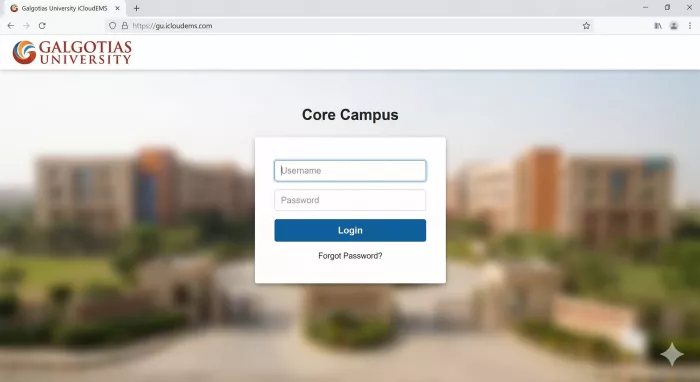
The official GU iCloud login page is:
You can also access it through the direct portal link: https://gu.icloudems.com/corecampus/index.php
Both addresses take you to the same login interface. There is no other official URL. If you have been directed to a different address, contact the university IT department to confirm.
How to Login to GU iCloud
Logging in requires credentials issued by the university. These are typically provided at the time of admission — either by the admissions office directly or sent to your registered email address.
- Step 1: Open your web browser and go to https://gu.icloudems.com
- Step 2: On the login page, enter your university-issued username or enrollment number in the username field.
- Step 3: Enter your password in the password field.
- Step 4: Click the Login button to access your dashboard.
- Step 5: After logging in, select your role — Student or Faculty — and click Proceed.
You will then see your personalised dashboard, which displays your relevant features, modules, and notifications based on your role.
GU iCloud works on any device with an internet connection. This includes laptops, desktop computers, tablets, and smartphones. There is also a dedicated mobile app called iCloudEMSV2, available on the Apple App Store.
How to Reset a Forgotten Password
If you have forgotten your password or cannot log in, the reset process is straightforward.
- Step 1: Go to the official login page at https://gu.icloudems.com
- Step 2: Click on the "Forgot Password" link on the login page.
- Step 3: Enter your username or user ID in the field provided.
- Step 4: Complete the captcha verification.
- Step 5: Select your college or branch from the dropdown menu.
- Step 6: Click the Submit button.
You will receive an email on your registered address with a link to reset your password. If you do not receive the email within a few minutes, check your spam folder. If the issue persists, contact the Galgotias University IT department or your academic office directly.
What Can You Do on GU iCloud?
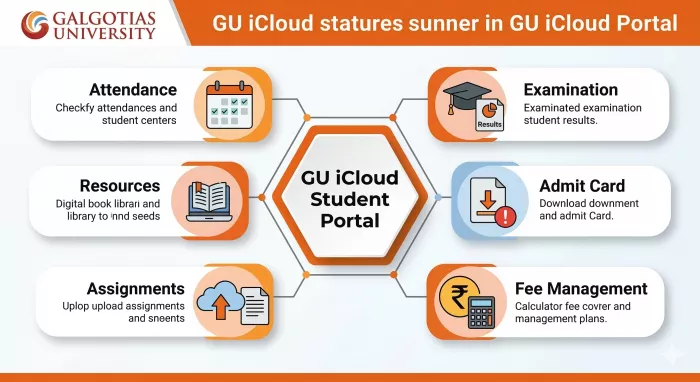
GU iCloud is designed to handle the full range of academic and administrative tasks for students and faculty. Here is a breakdown of the main features available on the platform.
For Students
- Academic records: View your attendance, internal marks, grades, results, and transcripts. All records are updated in real time by faculty and the academic office.
- Timetable and schedules: Check your weekly class timetable, room numbers, course codes, and any schedule changes posted by the university.
- Admit cards: Download your admit card for examinations directly through the portal. Note that you typically need to submit your feedback form and ensure your fees are paid before the admit card becomes available.
- Fee management: View your fee structure, check pending dues, view payment history, and download fee receipts. Some payment options are integrated directly into the portal.
- Assignments and submissions: Access assignments posted by faculty, submit completed work electronically, and receive feedback without needing to visit the department in person.
- Learning resources: Access a library of study materials including e-books, lecture notes, reference materials, and course-specific resources — all available remotely without needing to be on campus.
- Examination management: View exam schedules, seating plans, and download hall tickets. Results are also published through the portal once declared.
- Grievance submission: If you encounter any academic or administrative issue, you can submit a grievance form directly through the portal.
- Career and placement: Access career guidance resources, placement announcements, and alumni network information from within the dashboard.
- Communication: Use the integrated messaging system to interact with faculty, receive announcements, and stay updated on university circulars and events.
For Faculty
- Course management: Create and publish course materials, lecture content, assignments, and question papers. Update course syllabi and manage content for each batch or section.
- Attendance marking: Record and update student attendance digitally, which students can view in real time on their own dashboards.
- Assessment and grading: Evaluate submitted assignments, conduct online quizzes and tests, and publish marks directly to student profiles.
- Student performance monitoring: View individual student performance data, identify attendance shortfalls, and provide targeted academic support.
- Feedback management: Receive and review student feedback on courses and teaching, which contributes to accreditation processes.
How to Register on GU iCloud
For new students, registration is not done independently. The university initiates the process during admission.
At the time of enrollment, the university administrator provides login credentials — typically a user ID and password — sent to your registered email address. You do not need to create an account on your own. If you have been admitted but have not received your credentials, contact the admissions office or the IT department.
Once you have your credentials, log in at https://gu.icloudems.com, complete your profile, upload your photo, and explore the dashboard to familiarise yourself with the available features.
GU iCloud vs Apple iCloud: What Is the Difference?
This is one of the most common questions among new students and people searching the term for the first time.
GU iCloud is Galgotias University's education management system. It is a university-specific platform that manages academic records, attendance, assignments, fees, and institutional administration. It is used only by students, faculty, and staff of Galgotias University.
Apple iCloud is a general-purpose cloud storage and sync service developed by Apple Inc. It is used by iPhone, iPad, and Mac users to back up files, photos, and device settings.
The two have no connection whatsoever. The name similarity is coincidental. If someone searches for "GU iCloud" expecting Apple's service, they are looking for two entirely different things.
Is GU iCloud Safe?
Yes. The platform uses encrypted data storage and secure authentication to protect student and institutional data. Access is role-based, which means students can only view their own records, and faculty can only access data relevant to their courses and students. The platform is managed by iCloudEMS in coordination with the university IT team.
As with any academic portal, you should keep your login credentials private, not share your username or password with others, and log out after each session, especially when accessing the portal from a shared or public device.
Common Login Issues and How to Fix Them
- Wrong credentials: Double-check that you are entering the correct username format. Some students enter their email address when the portal requires an enrollment number, or vice versa. Confirm the correct format with your admissions documentation.
- Account locked: If too many failed login attempts have been made, your account may be temporarily locked. Contact the IT department to unlock it.
- Forgotten password: Follow the password reset steps described above. If you do not receive the reset email, contact the academic office.
- Browser issues: Clear your browser cache and cookies, then try again. The portal works on all major browsers, but an outdated browser may cause display or login problems.
- Technical errors: If the portal itself is unresponsive, it may be undergoing maintenance. Try again after a short time. For persistent issues, raise a support ticket with the university IT team.
Frequently Asked Questions
What is GU iCloud? GU iCloud is the official education management system of Galgotias University, accessible at gu.icloudems.com. It allows students and faculty to manage academic records, attendance, assignments, fees, and timetables from a single portal.
What is the GU iCloud login URL? The official login URL is https://gu.icloudems.com. You can also use the direct path: https://gu.icloudems.com/corecampus/index.php.
I forgot my GU iCloud password. What should I do? Go to the login page, click "Forgot Password," enter your username, complete the captcha, select your college or branch, and click Submit. A password reset link will be sent to your registered email address.
How do I get my GU iCloud login credentials? Credentials are issued by the university at the time of admission. If you have not received yours, contact the admissions office or the IT department at Galgotias University.
Is GU iCloud available on mobile? Yes. GU iCloud is accessible on any device through the web browser. There is also a dedicated mobile app called iCloudEMSV2 available on the Apple App Store, and the platform supports Android devices through the mobile browser.
Can I access GU iCloud from outside the university campus? Yes. The portal is accessible from any device with an internet connection, whether you are on campus or off campus.
Is GU iCloud the same as Apple iCloud? No. GU iCloud is Galgotias University's education management system. It has no connection to Apple's iCloud storage service.
What should I do if I cannot see my admit card on GU iCloud? Ensure your fees are paid and your feedback form has been submitted. If both conditions are met and the admit card is still unavailable, contact your department or the examination office.
Who can use GU iCloud? GU iCloud is used by students enrolled at Galgotias University, faculty members, and administrative staff. Access levels differ based on your role.
How do I check my attendance on GU iCloud? Log in to your student dashboard at gu.icloudems.com and navigate to the Attendance section. Your subject-wise attendance records are updated regularly by faculty.
What is iCloudEMS? iCloudEMS is the education management software platform developed by ESDS Software Solution Pvt. Ltd. Galgotias University uses a customised implementation of this platform, referred to as GU iCloud.
Can I submit assignments through GU iCloud? Yes. Faculty publish assignments on the platform and students can submit completed work electronically through the portal, removing the need for physical submission in most cases.
Summary
GU iCloud is the central academic portal for Galgotias University students and faculty, accessible at gu.icloudems.com. It handles everything from attendance and timetables to fee payments, exam schedules, assignments, and learning resources. Login credentials are issued by the university at the time of admission. If you need to reset your password, the process is handled directly through the portal using your registered email address. The platform is accessible from any device and is not affiliated with Apple's iCloud service.

Comments