Table of Contents
- What Matters When Choosing an Image-to-Video Tool
- Different Approaches to Image-to-Video Generation
- How Different Tools Fit Different Production Needs
- Tips for Getting Better Results From Any Image-to-Video Tool
- Is Unlucid AI Free?
- Getting Started: A Quick Walkthrough
- Frequently Asked Questions
- Image-to-Video AI Trends in 2026
- A Realistic Use Case: Testing a Campaign Concept Before Filming
- Building the Right Image-to-Video Workflow
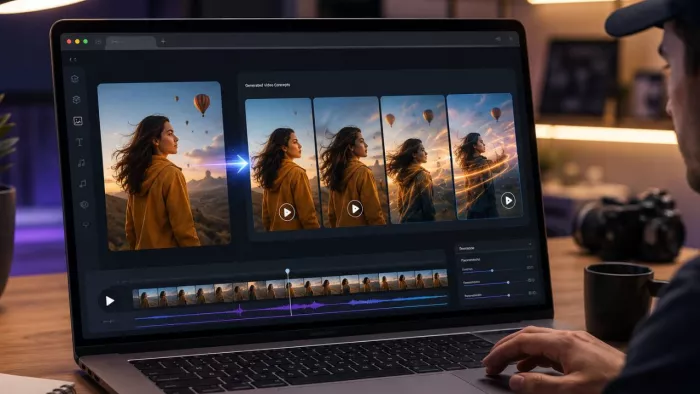
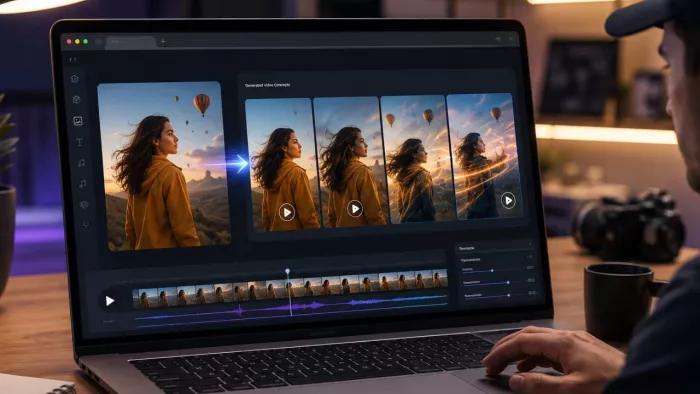
Animating a still image once required technical skills or a professional budget, but today many browser-based tools can produce a short video in minutes. Marketers, social media creators, and independent filmmakers now use these platforms for rapid visual production.
The right image-to-video AI generator depends on whether you need realistic motion, fast concept testing, stylized effects, or professional editing controls.
Dozens of platforms now offer similar features, but they differ significantly in motion quality, generation speed, pricing, and ease of use. Unlucid AI is easy to start using thanks to its simple interface, preset effects, and daily free credits.
What Matters When Choosing an Image-to-Video Tool
When choosing an image-to-video tool, creators should consider motion quality, generation speed, access restrictions, output limits, and the level of creative control.
Image-to-video platforms are designed for different tasks, from quick social media effects to professional production workflows. Promotional demos rarely show how a platform performs with ordinary user images, which makes practical evaluation especially important.
Motion naturalness. One of the hardest technical challenges in this category is animating a static image without warping objects, distorting faces, or smearing backgrounds. Motion consistency remains one of the most noticeable differences between free and premium tools in 2026.
Speed and queue times. For creators testing several ideas, a fast result can be more useful than a polished clip that takes much longer to produce.
Access friction. Some platforms require a paid subscription, a waitlist, or a lengthy onboarding flow before you can generate a single clip. Others let you upload an image and start generating an animated clip without lengthy onboarding.
Output length and resolution. Most image-to-video tools still produce clips lasting only a few seconds, so check the duration and resolution limits before adding a platform to your workflow.
Creative flexibility. Some tools offer only basic motion, while others support camera movement, object transformations, and stylized animation.
Different image-to-video platforms solve different creative problems. Some focus on polished production and detailed camera controls, while others are designed for rapid experimentation, stylized effects, or scenes with several moving elements.
For example, Runway is oriented toward professional production workflows, Kling AI emphasizes realistic motion, Pika focuses on stylized social media effects, and Luma AI is useful for more complex scenes. Unlucid AI takes a more accessible, experimentation-focused approach.
Different Approaches to Image-to-Video Generation
Unlucid AI as a Tool for Rapid Concept Testing
Unlucid AI is designed for users who want to animate an image quickly without learning a professional video editing platform. Its library includes more than fifteen presets, from slow rotations and sweeping camera pans to stylized effects that squeeze, crush, or peel objects apart.
Unlucid AI also includes image generation in realistic, cartoon, anime, pencil-sketch, and 3D styles. Basic editing tools allow users to remove objects, retouch photos, or replace details before animation. Because image generation, editing, and animation are available in one interface, users can prepare and animate an image without switching between several services.
Unlucid AI offers daily free credits, allowing new users to test the platform on a real project before choosing a paid plan. This makes the platform useful for testing a visual concept before spending time or money on a longer production.
The free tier is less reliable than leading paid platforms, particularly for longer clips or scenes with extensive movement, where objects may lose their shape or blend into the background. The platform works best for clips lasting three to five seconds. Free-tier videos have a lower resolution and include a watermark. During busier periods, free users may have to wait in a queue rather than get an instant result. These limitations make Unlucid AI better suited to quick experiments than to final, high-resolution production work.
When Other Production Workflows May Be More Suitable
Runway is a stronger fit for creators who need polished output, advanced camera controls, and an integrated video editing workflow. Users can control camera movement, build more complex scenes, and continue editing generated clips within Runway’s broader video production suite.
Runway takes longer to learn than a simple upload-and-animate tool and can become expensive for frequent users. Its advanced controls are useful for professional production but may be unnecessary for quick concept testing.
Kling AI is more suitable for videos that require realistic physical movement and consistent subject appearance. This makes Kling a strong option for videos intended for full-screen viewing rather than only for small in-feed playback.
Regional access and free-tier availability may be more limited than on some competing platforms, especially for users who generate videos regularly.
Pika focuses on stylized transformations, exaggerated motion, and ready-made effects for short social media videos. Its template-based interface requires little prompt-writing experience but offers less control over camera movement and scene composition.
Luma AI can animate several moving subjects and background elements within one frame, making it suitable for more complex scenes. Higher-resolution output requires a paid plan, and the free allowance may be too limited for frequent use.
How Different Tools Fit Different Production Needs
Unlucid AI stands out for its simple workflow and low barrier to entry, while Runway and Kling produce stronger results when output quality and precise control are the main priorities.
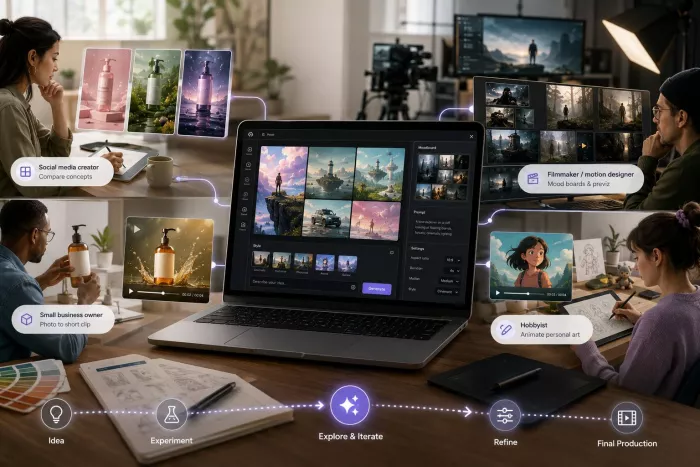
Image-to-video tools are often used to test ideas before full production. Marketers can animate product photos, social media creators can compare visual concepts, and filmmakers can preview shots before committing more time or money.
Runway and Kling are better suited to client-ready videos that require higher resolution, longer clips, and more precise motion control, which may justify their higher cost.
Where Unlucid AI Fits Into a Creative Workflow
Unlucid AI fits most naturally into early-stage creative work. Social media creators and marketers can use it to compare several visual concepts before selecting one for further development. Small businesses can also test whether a product photo works as a short animated clip before investing in a professional shoot.
Independent filmmakers and motion designers can use the platform to prepare mood boards and preview shots, while hobbyists can animate personal photos, illustrations, and character designs without learning traditional animation software.
Teams producing high-resolution branded videos may still prefer a professional platform for final production, although Unlucid AI can remain useful during early concept testing.
Tips for Getting Better Results From Any Image-to-Video Tool
The following practices can improve results across most image-to-video platforms:
Start with a clean source image. Low-resolution or heavily compressed images often produce visible artifacts, so use the original file instead of a screenshot whenever possible.
Keep the first attempt simple. Complex scenes with multiple moving subjects are where most image-to-video tools struggle. A clearly defined subject against a simple background usually produces a more convincing animation than a crowded composition.
Match the effect to the subject. Subtle camera movement usually works better for portraits. More dramatic or stylized effects tend to suit objects and illustrations, where distortion is less distracting.
Plan to generate several versions. Complex scenes rarely yield the best result on the first attempt, so try adjusting the prompt, source image, or animation effect before evaluating the platform.
Check licensing terms before commercial use. Free tiers don't always grant the same usage rights as paid plans. Before using a generated video in advertising or client work, check whether the platform’s license permits commercial use.
Is Unlucid AI Free?
Unlucid AI provides daily credits for image generation, editing, and animation. When the balance runs out, users must wait for the next refresh or choose a paid plan.
Videos generated on the free tier include a watermark and are limited to a lower resolution than paid output.
Getting Started: A Quick Walkthrough
Generating a video with Unlucid AI involves five basic steps:
1. Upload a source image. A well-lit photo with one clearly defined subject tends to produce the most convincing results.
2. Choose an effect or describe a motion. Pick from a preset animation style, or in some cases, add a short text description to guide how the AI should animate the image.
3. Generate and preview. The platform processes the request and returns a short clip, typically a few seconds long.
4. Review and iterate. If the first result doesn't look right, adjust the source image, try a different effect, or refine the prompt and generate again.
5. Download or export. Once satisfied, export the clip for use on social media, in a presentation, or as a reference for a larger production.
The process usually takes a few minutes, although generation may take longer when free users are placed in a queue.
Frequently Asked Questions
Do I need any editing experience to use an image-to-video AI tool? No. Most image-to-video tools are designed for beginners, although their simplified controls offer less precision than professional editing software.
Can I animate a photo with AI for free? Yes. Several image-to-video platforms offer free credits or limited free generations, although resolution, clip length, watermarks, and commercial rights may be restricted.
What should I expect from a free image-to-video tool? Free image-to-video tools are generally suitable for concept testing and short social media experiments. However, users should expect restrictions such as watermarks, lower resolution, shorter clips, limited credits, or slower generation during busy periods.
What affects the realism of AI-generated motion? Motion realism depends on the quality of the source image, the complexity of the scene, the number of moving subjects, and the platform’s ability to maintain consistent faces, objects, and backgrounds. Simple scenes with clearly defined subjects usually produce more convincing results. Production-oriented platforms such as Kling AI and Runway generally provide more control when motion consistency is a priority.
How long can the generated clips be? Most free plans produce clips lasting only a few seconds. Longer, scene-based clips are usually available on paid plans, but their quality remains less consistent.
Is free-tier output good enough for commercial use? It depends on the use case. For social media testing, concept validation, or low-stakes content, free-tier quality is often sufficient. For paid advertising campaigns or client-facing deliverables, the resolution cap and watermark on most free tiers make a paid plan the more practical choice.
What's the biggest mistake people make when trying these tools for the first time? The biggest mistake is evaluating a platform after one generation. Results vary with the source image, prompt, and effect, so test several versions before drawing a conclusion.
Image-to-Video AI Trends in 2026
Image-to-video platforms are currently improving in three main areas: motion consistency, clip length, and integrated editing workflows. Motion consistency remains one of the main differences between competing platforms, particularly in scenes with faces, hands, fabric, or several moving objects.
Maximum clip length is increasing, and more platforms can now produce outputs that resemble short scenes rather than isolated animations. However, generating longer videos with consistent characters, objects, and visual details remains technically difficult.
More platforms are combining image generation, editing, and animation within a single interface, reducing the need to transfer files between separate tools. This approach allows users to move from an initial image to an animated clip through a shorter, more streamlined workflow.
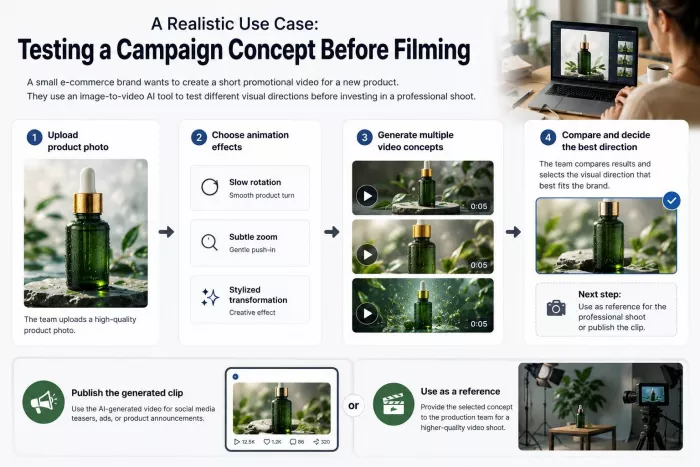
A Realistic Use Case: Testing a Campaign Concept Before Filming
Consider a small e-commerce brand preparing a short promotional video for a new product. The team can upload a product photo and test a slow rotation, subtle zoom, and stylized transformation before arranging a professional shoot. Comparing the results helps the team identify which visual direction best fits the brand. The team can then publish the generated clip or use it as a reference for a higher-quality production.
Building the Right Image-to-Video Workflow
Image-to-video AI works best when it is treated as part of a broader creative process rather than a complete replacement for video production. Lightweight platforms can help teams test ideas, compare visual directions, and prepare references before committing to a larger project. More advanced tools become useful when higher resolution, consistent motion, and detailed editing controls are required.
Unlucid AI is particularly suitable for the experimentation stage because it combines image generation, editing, and short-form animation in one accessible workflow. Its free output has clear limitations, but it gives creators a practical way to evaluate an idea before investing in professional production.


Comments