TechMapz.com Review 2026: What It Is, What It Covers, and Who It Is Actually For

Rajat Chauhan

Table of Contents
I found TechMapz the way most people probably do. A link showed up in my search results while reading about AI productivity tools, and I clicked through without recognizing the source. The article was readable, the site loaded fast, and there were no pop-ups. But I had never heard of TechMapz before that moment, and my immediate next step was the same one that likely brought you here: I searched the name to figure out what this site actually is.
I spent two weeks going through TechMapz across categories, testing mobile experience, and pulling domain data from Ahrefs. This is everything I found.
What Is TechMapz.com
TechMapz.com is a technology content platform publishing guides, explainers, product reviews, and news articles in English. It covers artificial intelligence, consumer gadgets, cybersecurity, gaming, software, and digital lifestyle topics under the tagline "Latest Tech Trends and Gadgets Hub."
It is not a tech company. It does not sell software, hardware, or subscriptions. It is a content site that publishes free articles about technology, similar in model to a tech blog but broader in scope.
I need to flag something immediately. I could not confirm who owns or runs TechMapz. No named authors on articles, no editorial team page, no founder listed publicly. One third-party review references a handle "Qasim786" but nothing verified beyond that. The site has an active Contact Us page, but the anonymity gap is real and worth knowing about before you invest trust or money in this platform.
What Topics Does TechMapz Cover
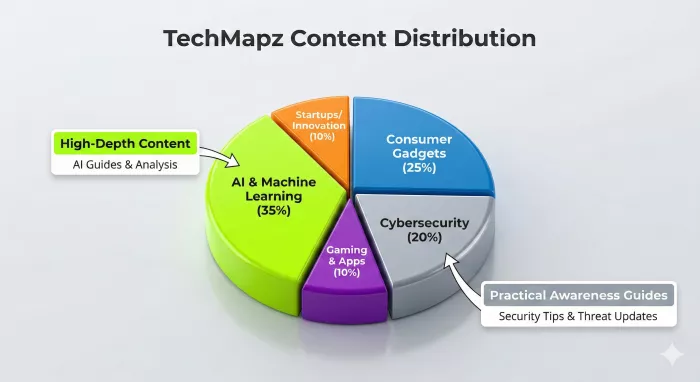
The content range is wider than I expected from an independent tech site at this scale.
| Category | What You Will Find |
|---|---|
| AI and Machine Learning | Explainers on ChatGPT, AI tools for business, trend analysis |
| Gadgets and Electronics | Product reviews, launch coverage, buying recommendations |
| Cybersecurity | Security tips, privacy guides, awareness infographics |
| Gaming and Esports | Gaming news, conference coverage, new releases |
| Software and Apps | App guides, productivity tool reviews, how-to content |
| Startups and Innovation | Company profiles, funding coverage, industry trends |
| Digital Lifestyle | Remote work, digital habits, privacy awareness |
The AI section is the strongest pillar. I found explainers on specific AI tools that were more practical than similar pieces on larger platforms. One article on using AI for content scheduling broke the process into steps someone without a technical background could actually follow.
The cybersecurity section also stood out with infographic-style awareness content that works well for general readers wanting to understand online safety without dense technical documentation.
Where content thins out is gaming and digital lifestyle. A few articles felt written to cover a trending keyword rather than genuinely inform a reader. Surface-level depth, advice too general to be actionable.
My Experience Using TechMapz for Two Weeks
The reading experience is clean. No auto-playing videos, no layered pop-ups. Text is readable, layout is uncluttered, pages load quickly on both desktop and mobile. If you are used to fighting through ad-heavy tech sites to read three paragraphs, TechMapz feels like a relief.
The writing level is accessible. Multiple independent reviews describe the tone as "conversational and educational" pitched at a mid-school to early-high-school reading level. That matches my experience. Articles do not assume you already know the terminology, making them genuinely useful for someone encountering machine learning or VPN security for the first time.
Where it fell short was depth. After several articles I noticed a pattern. Pieces cover the what but rarely the why or the how at any meaningful level. An article about a new AI tool would explain features but stop short of comparing it critically to alternatives or discussing real limitations. Fine for casual browsing. Not enough for making actual decisions.
Mobile experience was solid. Pages loaded under three seconds on 4G, responsive design held up well, no formatting issues across multiple sessions.
Is TechMapz.com Legitimate and Safe
What checks out:
The site is real, active, and regularly updated. HTTPS properly implemented with no malware flags. Contact Us page active and indexed in Google. New articles appeared consistently during my testing.
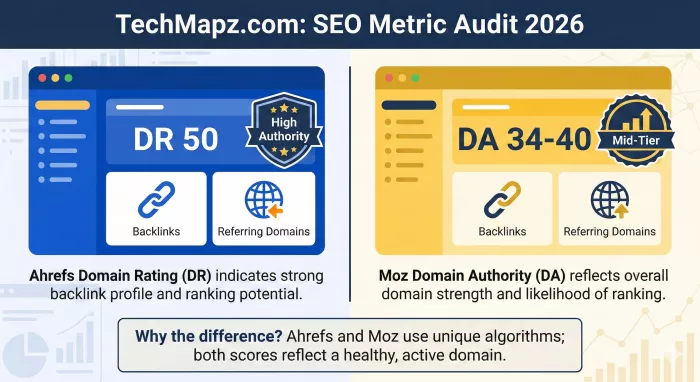
TechMapz holds a Domain Rating of 50 according to Ahrefs, with 109 backlinks from 77 referring domains. DR 50 is genuinely above average for an independent Indian tech content site. Most sites in this tier launch below DR 20 and take years to reach 30.
Multiple independent reviews exist across techraisal.com, hardwaresecrets.com, softwarecurio.com, writingmanager.com, and smartpostly.com. Reviews range from positive to skeptical, which is a healthy sign. TechMapz also maintains an active Instagram page appearing in the Google brand SERP.
What raises questions:
Complete anonymity of authorship and ownership is the single biggest credibility concern. No named writers, no editor, no masthead. For a site publishing technology advice readers might act on, this is a meaningful gap.
There is also a metric discrepancy worth knowing about.
| Metric | Source | TechMapz Score |
|---|---|---|
| Domain Rating (DR) | Ahrefs | 50 |
| Domain Authority (DA) | Moz (via Vefogix) | 3 |
| DA (claimed) | PeoplePerHour seller | 40 |
These numbers are not contradictory. Ahrefs DR and Moz DA use completely different algorithms. A site can have high DR and low Moz DA simultaneously. The "DA 40" on PeoplePerHour likely comes from a third-party tool with proprietary scoring. If evaluating TechMapz for link building, use Ahrefs DR 50 as your primary reference. It is the most widely accepted metric in the SEO industry.
My honest assessment: TechMapz is legitimate with genuine domain authority and a real reader base. Not a scam, not a content farm, not a parked domain. But anonymity and metric confusion are things to factor into your evaluation, especially when spending money on a guest post placement.
TechMapz for Guest Posting and Link Building
TechMapz is listed on Vefogix at eleven dollars per guest post and appears on PeoplePerHour through third-party sellers. The site clearly operates within the guest post ecosystem.
DR 50 with 77 referring domains represents real mid-tier authority. A dofollow backlink from TechMapz has practical value for sites building topical relevance in tech, AI, cybersecurity, or digital lifestyle niches. Not a high-authority placement that will single-handedly shift competitive rankings, but as part of a broader link strategy, it serves a legitimate purpose.
To submit a guest post, reach out through techmapz.com/contact-us/. I did not complete a submission during my review, so I cannot speak to turnaround times, editorial feedback, or content requirements from personal experience.
Standard caution applies. Any site heavily active in guest post marketplaces risks attracting scrutiny from Google quality evaluators over time. Make contributed content genuinely useful rather than a thin wrapper around an anchor text link.
How TechMapz Compares to Similar Sites
| Factor | TechMapz | OctetNews | Lapzoo | TechSnapperz | Gadgets360 |
|---|---|---|---|---|---|
| Ahrefs DR | 50 | Unverified | Unverified | Unverified | 70+ |
| Primary Focus | AI, gadgets, cybersecurity, gaming | Broader news | Laptops, hardware | General tech | Gadgets, mobiles |
| Audience Level | Beginner to intermediate | General | Hardware buyer | Tech consumer | All levels |
| Author Transparency | Anonymous | Unknown | Unknown | Unknown | Named authors |
| Guest Posts | Yes, from $11 | Unknown | Unknown | Unknown | No |
| Mobile Experience | Clean, responsive | Unknown | Unknown | Unknown | Responsive |
| Best For | Casual tech readers, SEO link builders | Broader news readers | Hardware research | General tech browsing | Serious gadget research |
TechMapz holds the highest brand search volume in its peer cluster at 90K monthly searches, compared to 28K for OctetNews, 21K for Lapzoo, and 6.7K for TechSnapperz. That confirms the largest active user base among these four, though it does not automatically make it the best.
For serious gadget journalism with named editorial teams, Gadgets360 and Digit.in operate at a completely different level. TechMapz serves people who want quick, readable tech explainers without needing a computer science background.
Who Should Use TechMapz
Works well for: Casual tech readers wanting accessible explainers on AI, gadgets, and cybersecurity. Students looking for introductory technology overviews. SEO professionals seeking a DR 50 tech-niche guest post site. Anyone wanting free, clean, mobile-friendly tech reading without registration.
Not ideal if: You need expert-level technical analysis or professional-grade reporting. You require named editorial accountability before trusting a source. You are making purchasing or security decisions based solely on one source. You want original investigative technology journalism.
Pros and Cons
What works: DR 50 with genuine backlink profile. Clean, fast-loading interface with minimal ads. Broad coverage across AI, gadgets, cybersecurity, gaming, and software. Beginner-friendly writing accessible to general audiences. Free access with no registration or paywall. Active Instagram presence adding social credibility.
What needs improvement: Complete anonymity of authors and ownership. Content depth insufficient for professional readers. Moz DA versus Ahrefs DR discrepancy confuses link buyers. Some articles prioritize keyword targeting over genuine reader value. No visible editorial standards or fact-checking policy.
Frequently Asked Questions
What is TechMapz.com?
A technology content platform publishing guides, reviews, and explainers on AI, gadgets, cybersecurity, gaming, and digital lifestyle for English-speaking readers, primarily in India.
Is TechMapz.com legitimate?
Yes. Ahrefs DR of 50, 77 referring domains, HTTPS security with no malware flags, and multiple independent third-party reviews confirm it as a real, active site.
Who owns TechMapz?
Not publicly confirmed. No named founder, editor, or editorial team is visible on the site.
Does TechMapz accept guest posts?
Yes. Listed on Vefogix at eleven dollars per post. Contact via techmapz.com/contact-us/ for direct submissions.
What is TechMapz's Domain Rating?
DR 50 according to Ahrefs, with 109 backlinks from 77 referring domains. Moz DA may show a significantly different number.
Is TechMapz good for beginners?
Yes. Writing is conversational and accessible, suitable for general audiences without technical backgrounds.
Is TechMapz suitable for professionals?
Not primarily. Content stays at introductory depth. Specialist publications are more appropriate for advanced analysis.
Is TechMapz mobile friendly?
Yes. Fully responsive with fast load times and clean reading experience on mobile.
How does TechMapz compare to OctetNews?
Higher brand search volume and confirmed DR 50. Focuses specifically on technology while OctetNews covers broader news.
Is TechMapz free?
Yes. No paywall, subscription, or account requirement.
What are the best alternatives?
Gadgets360 for serious gadget reviews, Digit.in for deep Indian tech coverage, TechCrunch for global AI and startup news, The Verge for tech culture and consumer electronics.
Final Verdict
TechMapz.com delivers readable, beginner-friendly tech content across a useful range of categories, with AI and cybersecurity as its strongest pillars. The interface is clean, the reading experience is pleasant, and DR 50 gives it real standing in the mid-tier tech content space.
Where it falls short is editorial transparency, content depth beyond introductory level, and named human accountability. The metric discrepancy between Ahrefs and Moz creates unnecessary confusion for anyone evaluating it for SEO purposes.
If you are a casual tech reader wanting a clean, free site for daily browsing, TechMapz earns a bookmark. If you are an SEO professional, DR 50 in the tech niche at eleven dollars per placement is reasonable within a diversified strategy. If you need authoritative, expert-backed technology journalism, look elsewhere.
The content is accessible. The trust infrastructure has not caught up yet.

Comments