SplashLearn Review 2026: Is It Actually Worth Using?

Rajat Chauhan
Table of Contents
- What Is SplashLearn?
- The Problems You’re Actually Trying to Solve
- SplashLearn Features: What It Does Well (and What It Doesn’t)
- How Teachers Actually Use SplashLearn: A Week in Grade 3
- SplashLearn Pricing: Cost Breakdown for 2026
- Privacy and Safety: What Parents Should Know
- Should You Pick SplashLearn or Something Else?
- Final Verdict: Is SplashLearn Worth It?
- SplashLearn Ratings Summary
Your class has raced through the worksheet. Half the answers are wrong, a few kids are bored, and someone just asked, “Can we play a math game instead?” Tools like SplashLearn promise to turn that chaos into meaningful practice—but does it really help, or is it just another app on the iPad?
This SplashLearn review looks at the platform through real teacher and parent problems: keeping kids engaged, differentiating without burning out, and finding something that is safe, affordable, and genuinely useful for K–5.
What Is SplashLearn?
SplashLearn is a game‑based learning platform offering math (PreK–5) and reading (PreK–2) practice through 4,000+ interactive games and activities. The platform adapts to each student’s level, providing personalized practice while giving adults instant performance data. It is backed by ESSA Level III “Promising Evidence” research that found statistically significant positive links between regular use and math achievement gains in elementary students.
Quick verdict: Free and powerful for teachers, potentially worth it for parents who will actually use the data, but not a full curriculum.
The Problems You’re Actually Trying to Solve
Before deciding whether SplashLearn fits your classroom or home, identify the specific pain points it addresses.
Common teacher/parent frustrations:
- “My students rush through practice and don’t want to check their work.”
- “I have kids who are two years ahead and two years behind in the same room.”
- “Families want ‘good learning apps,’ but most are junk or full of ads.”
- “I don’t have time to grade every practice set and still plan tomorrow’s lesson.”
SplashLearn’s promise is to turn those into: automatic differentiation, ad‑free practice that feels like a game, and dashboards that do the heavy lifting on tracking. If those aren’t your problems, this may not be the right tool.
SplashLearn Features: What It Does Well (and What It Doesn’t)
Where SplashLearn Excels
- Daily fluency and skills practice
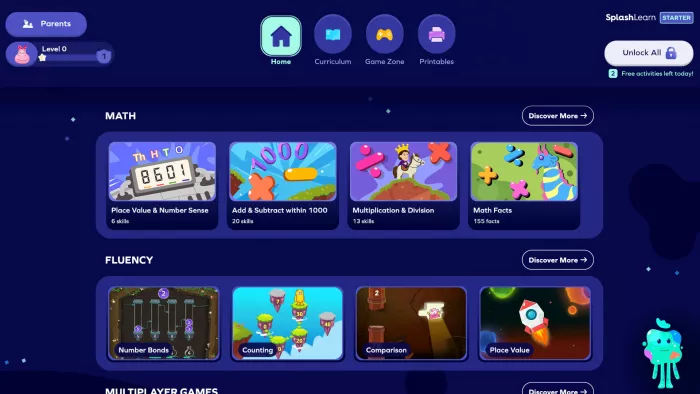
Over 4,000 math and reading games cover core skills from counting and phonics through fractions and basic geometry. Students work through short, game‑like tasks instead of long worksheets, which tends to keep them engaged longer.
- Automatic differentiation
The adaptive engine adjusts question difficulty based on each child’s performance. Struggling students see more scaffolded problems; confident students get harder questions. You are not constantly creating three versions of every assignment.
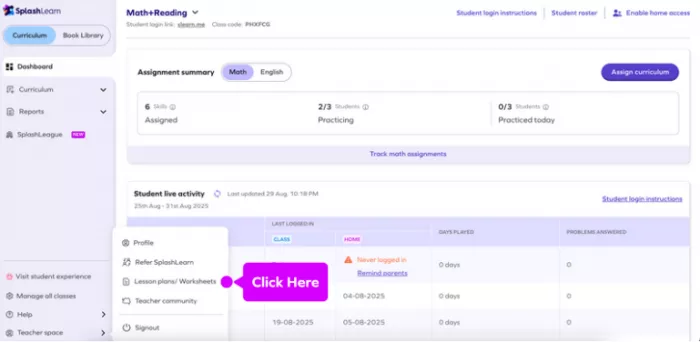
- Teacher dashboards and progress tracking
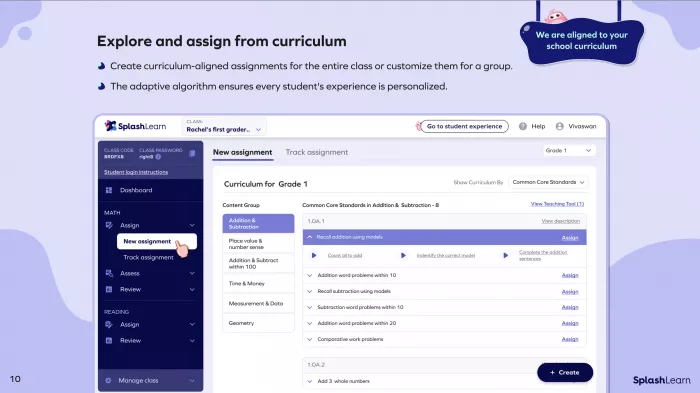
Reports show which skills are mastered, developing, or untouched—broken down by standard and by student. That makes small‑group formation, choosing review topics, and talking with families much easier and more concrete.
- High engagement for most students
The “Splashverse” world, coins, and rewards system make most students experience the platform as a game rather than a test. Many teachers report higher time‑on‑task compared with traditional paper drills.
What SplashLearn Doesn’t Handle
- Not a full curriculum
SplashLearn follows common standards but focuses on short, closed‑response questions, not full lessons or rich mathematical tasks. You still need your main curriculum for concept development, discussion, and open‑ended problem solving. - Limited upper‑grade ELA content
Reading activities currently stop around Grade 2. Upper‑elementary students may still use the math side, but ELA support is minimal beyond early literacy. - Needs adult engagement for best results
The app can keep kids busy, but the biggest gains show up when teachers or parents actually look at the reports and adjust instruction or homework. When adults ignore the data, it becomes “just another game.”
How Teachers Actually Use SplashLearn: A Week in Grade 3
Here’s how a typical week might look for a Grade 3 teacher using the free teacher account.
- Monday – 10‑minute warm‑up
Students open the class link and start a multiplication practice set. The app adapts in real time—some work on ×2 and ×5 facts while others tackle ×8 and ×9. After 10 minutes, the dashboard shows three students consistently missing ×6 facts, which you mark for tomorrow’s small‑group focus. - Wednesday – rotation stations
- Group 1 works with you on multi‑step word problems.
- Group 2 uses manipulatives.
- Group 3 completes assigned SplashLearn fraction activities aligned to this week’s unit.
- The adaptive system keeps advanced students from sitting bored on simple halves—their path quietly shifts toward mixed numbers and comparisons.
- Friday – quick formative check
Instead of a traditional quiz, you assign a short mixed‑review sequence in SplashLearn. End‑of‑session reports show which standards are strong enough to move on from and which need spiral review next week. - In each case, SplashLearn is doing the unglamorous work—generating level‑appropriate problems and logging data—so your time goes into explanations, feedback, and grouping.
SplashLearn Pricing: Cost Breakdown for 2026
Understanding the financial model is essential, especially if you plan to recommend it to families.
For Teachers and Schools: Completely Free
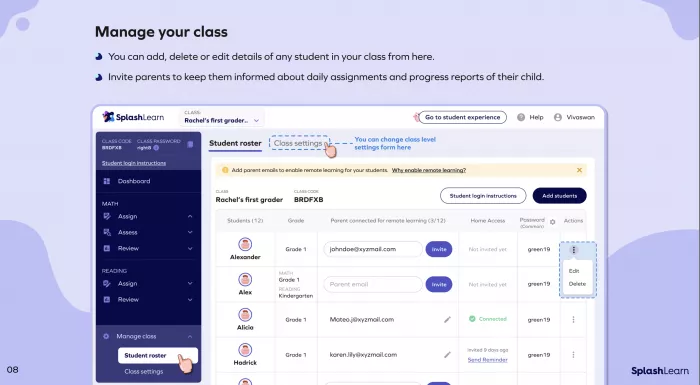
Teachers get full access to reports, assignments, and most content with no paywalls or mid‑year “upgrade” prompts. Many districts use it as a zero‑cost supplement alongside their core program.
For Parents: Trial, Then Subscription
- 7‑day free trial for all features
- Monthly plans around 7.99–11.99 USD
- Annual plans roughly 89 USD per year for one child
- Family plans for multiple children at a discount
Important warnings for parents: reviews frequently mention surprise auto‑renewals and difficulty getting refunds or timely support.
- If you point families to SplashLearn, it is fair to suggest they:
- Set a reminder a few days before the trial ends
- Read the renewal terms carefully
- Use teacher‑linked access (which is free) whenever their school offers it
Privacy and Safety: What Parents Should Know
The good news is that SplashLearn was built for children and takes privacy seriously.
It is compliant with child‑privacy and student‑data laws such as COPPA and FERPA, with a separate child privacy policy and data‑processing agreements for schools.
Data is encrypted in transit and at rest, and the learning environment is ad‑free—no external ad networks or tracking pixels in the student experience.
Independent privacy evaluators give it an overall positive rating, though they still advise schools to review the details.
What SplashLearn collects:
- Student first name (or nickname), grade level, class grouping, and performance data (answers, time spent, progress)
- For parent accounts, billing and contact information
- Data is retained for limited periods when accounts go inactive and can be deleted at a parent’s or school’s request.
- For most classrooms and families, this is a reasonable trade‑off, but districts should still confirm that SplashLearn aligns with local policies and obtain the appropriate consents.
Should You Pick SplashLearn or Something Else?
Use SplashLearn if…
- You teach PreK–5 and want free, standards‑aligned practice with solid dashboards
- Your students respond well to game‑based learning and reward systems
- You need cross‑device compatibility, including offline access in the mobile app (activities sync once the device reconnects)
- You or parents are willing to glance at reports and use them to inform grouping, review, or homework
Consider alternatives if…
- You need a comprehensive curriculum with deep conceptual instruction; SplashLearn is designed as a supplement
- Your students are mostly above Grade 5 or need upper‑elementary ELA coverage
- Billing complications are a major concern in your school community
- You want a true “set it and forget it” tool; SplashLearn works best when adults engage with the data
Popular alternatives:
Khan Academy Kids (free, video and practice), IXL (K–12, more comprehensive but pricier), Prodigy (heavier RPG style), and ABCmouse (stronger for younger ages), 99math, Blookit.
Final Verdict: Is SplashLearn Worth It?
For K–5 educators and engaged parents, SplashLearn offers strong value as a research‑backed practice platform. It is genuinely free and useful for teachers, and it can be worth the subscription for families who will use it consistently and pay attention to the insights.
Best use case: 10–15 minute daily warm‑ups, rotation‑station work, differentiated homework, and quick formative checks in math (and early reading).
Skip or limit it if: you are looking for a full curriculum, need robust upper‑elementary ELA, or want software that improves outcomes without any adult oversight.
SplashLearn Ratings Summary
| Category | Rating | Notes |
|---|---|---|
| Engagement | ⭐⭐⭐⭐⭐ | Kids generally enjoy the game world and rewards |
| Differentiation | ⭐⭐⭐⭐½ | Adaptive engine personalizes difficulty well |
| Teacher Tools | ⭐⭐⭐⭐ | Free dashboards and reports are robust |
| Parent Value | ⭐⭐⭐½ | Good value if the app is used regularly |
| Curriculum Depth | ⭐⭐⭐ | Strong for practice; not designed for full instruction |
| Privacy/Safety | ⭐⭐⭐⭐ | Child‑privacy compliant, ad‑free environment |
Overall: about 4.2/5 for its intended role as a supplemental practice tool.

Comments