Read AI and 8 Alternatives to Try in 2026

Trevor Hall
What Is Read AI?
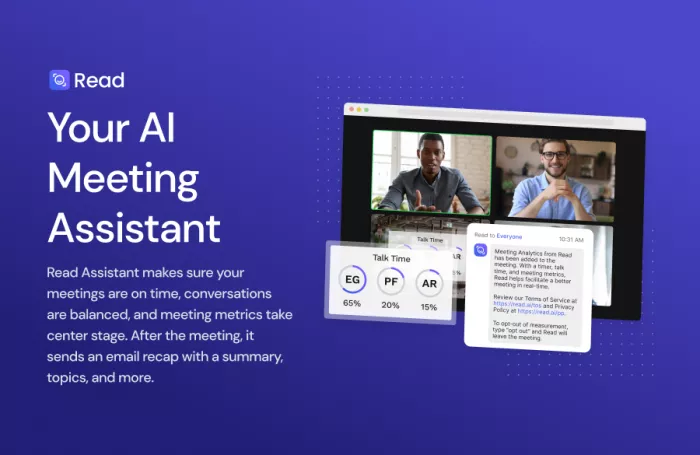
Read AI is an AI meeting assistant that joins your calls, records audio/video, transcribes conversations, and generates rich summaries, engagement metrics, and speaker analytics. It integrates with tools like Zoom, Google Meet, Microsoft Teams, Slack, Notion, HubSpot, and Salesforce, and can also summarize emails and messages to keep knowledge workers on top of conversations.
Core Features of Read AI
1. AI meeting summaries and action items
a. Automatic bullet-point recaps with highlights, next steps, key questions, and named owners for action items.
b. Post‑meeting email recaps that land in your inbox within minutes, including summaries, topics, and metrics.
2. Engagement, sentiment, and speaker analytics
a. Real-time engagement scores that track participation levels and show how interest changes across the meeting.
b. Sentiment analysis based on tone, responsiveness, and participation, plus talk-time breakdowns for each speaker.
3. Speaker Coach and performance insights
a. Private “Speaker Coach” that analyzes your pace, filler words, and talk-to-listen ratio to help improve communication skills.
b. Trend dashboards to see how meeting quality, engagement, and behaviors evolve over time at team or org level.
4. Cross‑platform support and integrations
a. Works across Zoom, Google Meet, and Microsoft Teams without complex configuration, joining calls automatically from your calendar.
b. Integrates with Slack, Notion, CRMs, and other tools to push notes and action items into existing workflows.
5. Meeting scheduler and assistant behavior
a. Smart scheduler with personalized links and automatic joining of upcoming meetings when enabled in your calendar.
b. AI assistant that can send recaps, show top talkers, highlight the most impactful statements, and surface meeting metrics.
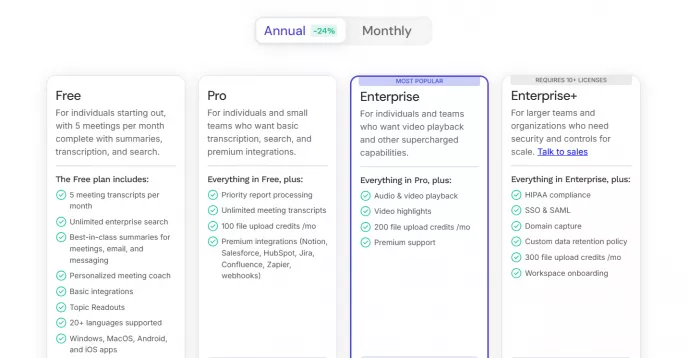
Read AI Pricing (2026 Snapshot)
Read AI: Pros, Cons, and Best Use Cases
Key Pros
1. Deep analytics beyond transcription
a. Combines transcription, engagement scoring, sentiment analysis, and talk-time analytics in one dashboard.
b. Trend data across meetings helps leaders identify meeting overload, dominant speakers, and recurring bottlenecks.
2. Strong automation and recap experience
a. Automated summaries and action-item lists save hours for users dealing with back-to-back calls.
b. Email recaps and highlights make post‑meeting follow-up simpler for sales, CS, and project teams.
3. Solid multi‑platform support
a. Works smoothly with major conferencing platforms and calendars, reducing friction for distributed teams.
b. Integrations with collaboration and CRM tools help centralize meeting intelligence.
Major Cons
1. Privacy and intrusive bot behavior
a. Users report Read AI bots joining meetings uninvited or unexpectedly, raising serious privacy concerns.
b. Some institutions (e.g., universities) have issued warnings over its data access, retention, and compliance profile.
2. Restrictive free tier and price scaling
a. Free plan is limited to a small number of transcripts per month and lacks key capabilities like audio/video playback.
b. Per‑user pricing can become expensive as teams grow, especially when compared with usage‑based alternatives.
3. Compliance locked behind top tier
a. HIPAA and advanced security features are only available on Enterprise+ plans, making it less accessible to smaller healthcare or sensitive-data teams.
b. Organizations seeking tight control over data often find better options with tools that prioritize scoped access and governance.
Best For
1. Mid‑size and large teams that want rich meeting analytics and coaching on top of standard note‑taking.
2. Sales, customer success, and leadership teams that run many client-facing or cross‑functional calls and value trend data and engagement scores.
8 Alternatives to Read AI
1. Otter.ai – Real‑Time Transcription Powerhouse
Otter.ai is one of the most established AI meeting assistants, offering live transcription, searchable notes, and AI-powered summaries across Zoom, Google Meet, Teams, and in‑person conversations. It also provides an AI chat layer so users can query past meetings or notes conversationally.
Key Features
● Live transcription with speaker identification across popular conferencing platforms and mobile.
● AI‑generated summaries and key points after each meeting, plus searchable archives.
● Collaboration features like shared notes, comments, and team spaces.
Pros
● Mature product with reliable live transcription and broad device coverage.
● Strong for hybrid work scenarios where people attend from different locations or devices.
Cons
● Less emphasis on deep engagement/sentiment analytics compared with Read AI.
● Interface and feature set can feel dated or cluttered versus newer meeting copilots.
Best Use Case
● Teams that prioritize real‑time transcription and collaborative notes during calls, especially in education, internal meetings, and hybrid setups.
2. Fireflies.ai – Workflow Automation for Revenue Teams
Fireflies.ai focuses on automating the entire meeting workflow: recording, transcribing, summarizing, and pushing data into CRMs and project tools. It targets sales and revenue teams that need robust conversation intelligence and automation.
Key Features
● AI note‑taking bot that records and transcribes calls across major platforms.
● Conversation intelligence: topic detection, speaker insights, and keyword tracking.
● Deep integrations with CRMs, project tools, and collaboration apps for automated follow‑up.
Pros
● Strong automation and CRM workflows that simplify sales follow‑up and documentation.
● Suitable for multi‑tool stacks where meeting data must flow into several systems.
Cons
● Can feel heavy for teams that just want simple notes and summaries.
● Learning curve for fully configuring automations and analytics.
Best Use Case
● Sales and revenue operations teams that want meeting notes tightly connected to pipelines, deals, and CRM data.
3. Fathom – Generous Free Plan for Individuals & Small Teams
Fathom stands out primarily for its generous free‑forever plan, which includes unlimited recordings and transcriptions, plus AI‑generated highlights and summaries. It is popular with individuals, consultants, and small teams trying to cut SaaS costs without losing core functionality.
Key Features
● Unlimited recordings and transcriptions on the free plan, with AI highlights and action items.
● Ability to edit transcripts, reassign speakers, and bulk‑edit sections, which Read AI currently limits.
● Shareable clips and integrations for sending snippets to tools and clients.
Pros
● Very budget‑friendly with a strong free tier that outperforms many competitors.
● Rich transcript editing features and speaker tag control, improving accuracy.
Cons
● Less sophisticated engagement analytics and trend dashboards compared with Read AI.
● Not as enterprise‑oriented for compliance and large‑scale governance.
Best Use Case
● Freelancers, coaches, and small teams that need powerful recording and transcription without high per‑seat costs.
4. tl;dv – Search Across All Your Meetings
tl;dv (too long; didn’t view) focuses on making it easy to revisit and search across many meetings, especially for research, product, and UX teams. Rather than just summarizing each call, it emphasizes cross‑meeting search and highlight management.
Key Features
● AI‑powered cross‑meeting search to find moments, topics, or keywords across a large archive.
● Highlight creation and sharing, useful for research clips, product feedback, and stakeholder updates.
● Integrations with tools like Slack, Notion, and CRM platforms.
Pros
● Excellent for teams that regularly mine past conversations for insights.
● Helps reduce rewatching full recordings by surfacing the most relevant moments.
Cons
● Less oriented toward detailed engagement analytics and speaker coaching.
● May be overkill if you mostly care about single‑meeting summaries rather than long‑term archives.
Best Use Case
● Product, UX, and research teams that gather insights from many customer/user calls and need powerful search and highlight workflows.
5. MeetGeek – Balanced Assistant with Clear Controls
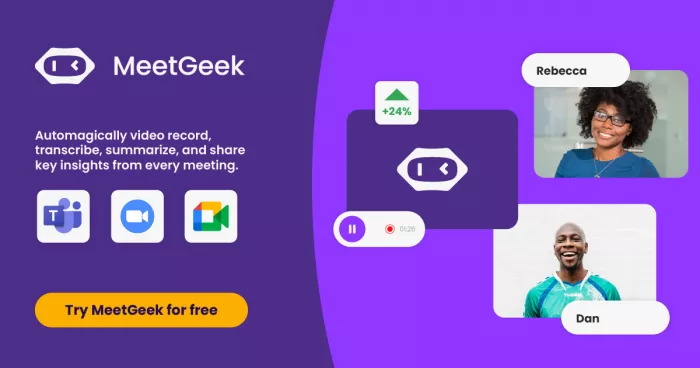
MeetGeek is an AI meeting assistant that records, transcribes, and summarizes calls, with a focus on collaboration and clearer control over when and how the assistant joins meetings. It competes directly with Read AI but aims to be more transparent for privacy‑conscious teams.
Key Features
● Automatic note‑taking, summaries, and insights for calls on Google Meet, Zoom, and Microsoft Teams.
● Calendar integration and collaboration tools for sharing and editing meeting notes.
● Configurable capture behavior so users can better control when AI joins and records meetings.
Pros
● Strong mix of summaries and insights without feeling overly intrusive.
● Better clarity around capture settings, which appeals to teams worried about bots joining unexpectedly.
Cons
● Ecosystem and brand recognition are smaller than legacy players like Otter.ai.
● Analytics depth is improving but still less advanced than Read AI’s full engagement suite.
Best Use Case
● SMBs and mid‑size teams that want AI‑powered notes and summaries but value transparent controls over recording and data capture.
6. Jamie (MeetJamie) – Bot‑Free, Privacy‑First Meeting Notes
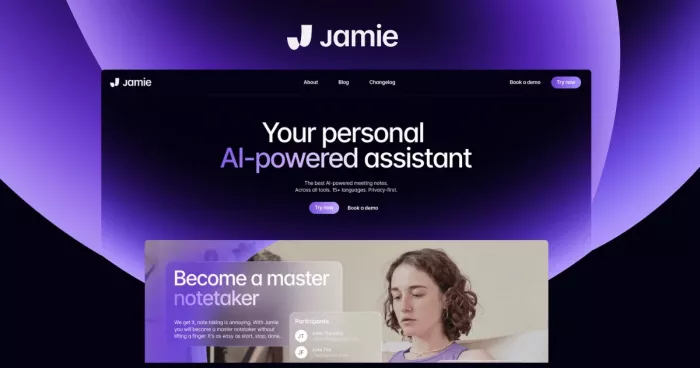
Jamie positions itself explicitly as a private, bot‑free alternative to Read AI, promising smart meeting notes without adding visible bots to calls. It focuses on intelligent notes, offline capabilities, and minimal disruption for participants.
Key Features
● Bot‑free capture approach that avoids the perception of a third party joining your call.
● Intelligent notes, summaries, and task extraction, similar to other assistants.
● Privacy‑centric design and simple UX.
Pros
● Strong fit for organizations where privacy optics are as important as actual security controls.
● Reduces meeting friction by eliminating the “there’s a bot in the call” effect.
Cons
● Less robust engagement and sentiment analytics than Read AI.
● Smaller integration ecosystem compared with older players.
Best Use Case
● Consultants, agencies, and privacy‑sensitive organizations that want AI-generated notes but avoid bots visibly joining meetings.
7. Speakwise – Mobile‑First Read AI Alternative (iOS)
Speakwise is a mobile-first AI meeting companion that excels for iOS users who need discrete recording and fast AI summaries synced into tools like Notion. It claims significant time savings for post‑meeting follow‑up and high transcription accuracy in good audio conditions.
Key Features
● iOS app for discrete meeting recording and instant AI summaries.
● Native Notion integration and other knowledge-tool connections.
● 95%+ transcription accuracy under optimal audio conditions, plus strong follow‑up support.
Pros
● Excellent choice for founders, sales reps, and consultants who live on their phones.
● Strong combination of mobile UX, summaries, and knowledge‑base integration.
Cons
● iOS‑focused; not ideal as a primary solution for desktop-first organizations.
● Less emphasis on full meeting analytics or organizational dashboards.
Best Use Case
● On‑the‑go professionals using iOS who want quick, high‑quality summaries and tight Notion integration.
8. eesel AI – Security‑Focused Alternative With Scoped Access
eesel AI is often positioned as a privacy‑ and control‑focused alternative to Read AI, emphasizing precise scoping of which data the AI can access, along with risk‑free simulations before deployment. While it is broader than just “meeting notes,” it is attractive for security‑sensitive organizations.
Key Features
● Scoped data access: admins can tightly define what content the AI is allowed to see.
● Risk‑free simulation mode to test AI behavior without broad permissions.
● Meeting and workspace intelligence designed to be compliant and transparent.
Pros
● Better alignment with organizations that prioritize compliance, data minimization, and governance.
● Clearer controls over data retention and access compared with Read AI.
Cons
● Less specialized in meeting analytics alone; more of a general AI workspace assistant.
● May require more upfront configuration to realize full benefits.
Best Use Case
● Security‑ and compliance‑driven teams that want AI assistance but will not compromise on scoped access and governance.
Conclusion: How to Choose Between Read AI and Its Alternatives in 2026
When evaluating Read AI against these alternatives in 2026, the decision usually comes down to three axes: analytics depth, privacy/control, and pricing structure.
● Choose Read AI if you want the richest combination of summaries, engagement analytics, sentiment, and speaker coaching and can accept the privacy trade‑offs and pricing.
● Choose Fathom or Otter.ai if you mainly want transcription and summaries, with Fathom favored for free usage and Otter for real‑time collaboration.
● Choose Fireflies.ai, tl;dv, or MeetGeek if workflows and cross‑meeting insights matter more than coaching, with each serving slightly different operational needs.
● Choose Jamie, Speakwise, or eesel AI if privacy, discreet capture, and tight data control are non‑negotiable.

Comments