QuikConsole.com: Complete Legitimacy Investigation and Verified Alternatives Guide (2026)

Trevor Hall
Table of Contents
- Legitimacy Verdict
- What QuikConsole Claims to Be
- Red Flags and Verification Failures
- Why Search Rankings Do Not Equal Legitimacy
- Verified Productivity Alternatives
- Gaming Console Management: Use Official Apps
- How to Verify Any Platform
- If You Already Used QuikConsole.com
- Frequently Asked Questions
- Final Verdict
QuikConsole.com attracts roughly 45,000 monthly searches, yet multiple independent investigations reveal it lacks basic transparency requirements, has no verified user base, and shows red flags across every standard verification method. This guide documents what we found and provides legitimate alternatives.
Legitimacy Verdict
After thorough investigation, QuikConsole.com appears to be a phantom platform with no verifiable operational status.
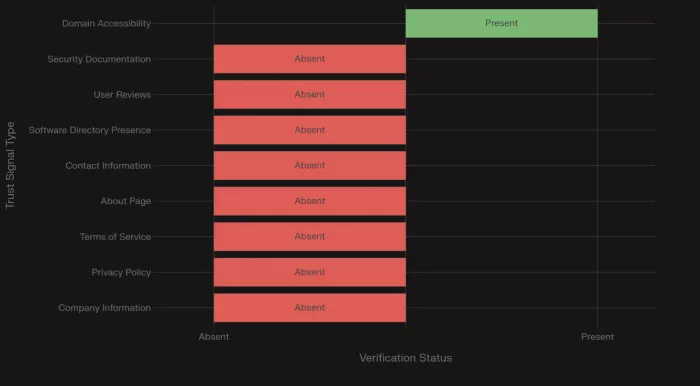
The platform claims to function as an all-in-one productivity tool, gaming console manager, and cloud storage solution. Our research found zero presence on G2, Capterra, Product Hunt, or Trustpilot. The official website contains blog posts about cryptocurrency, luxury resorts, medical conditions, and classifieds rather than product documentation. No privacy policy, terms of service, or company ownership information could be located.
Should you use it? No. The combination of missing legal documentation, unverified functionality claims, and complete absence from software marketplaces creates unacceptable risk. Verified alternatives exist for every function QuikConsole claims to provide.
What QuikConsole Claims to Be
QuikConsole makes three distinct sets of claims that, taken together, raise immediate credibility questions.
Productivity platform: A unified workspace consolidating task management, text transformations, validation tools, and data organization into a single dashboard targeting freelancers, content creators, and small teams.
Gaming console manager: Real-time temperature monitoring, storage management across Xbox, PlayStation, and Nintendo platforms, and performance optimization alerts.
All-in-one digital hub: Combines productivity, gaming, and cloud storage with "military-grade security" and "bank-level encryption."
The positioning ambiguity itself is a red flag. Legitimate software platforms establish clear primary functionality rather than claiming to serve all users across contradictory use cases.
Red Flags and Verification Failures
Missing Company Information
Zero information about ownership, founding team, physical location, or corporate registration. No identifiable individuals or organizations could be found operating the platform. Users cannot determine who controls their data or who holds legal responsibility.
No Privacy Policy or Terms of Service
These are mandatory requirements under GDPR and CCPA for any platform processing user data. Their absence indicates either regulatory non-compliance or intentional avoidance of legal accountability.
Zero Software Directory Presence
No listings on G2, Capterra, Product Hunt, or Trustpilot. Even beta-stage platforms establish directory presence to build community and gather feedback.
Website Content Disconnect
The official website publishes articles about AI image generators, cryptocurrency, luxury resorts, architectural stone, medical conditions, NFT marketplaces, and classified ads. Zero content addresses QuikConsole's claimed features or provides product documentation. This suggests abandoned project status, compromised hosting, or content farm operations.
No User Community
Extensive searches across Reddit, YouTube, gaming forums, and social media revealed zero organic discussions, tutorials, or testimonials. A platform with 45,000 monthly searches should generate substantial community engagement. The absence suggests traffic comes from curiosity and verification attempts, not actual usage.
Why Search Rankings Do Not Equal Legitimacy
Search engines rank content based on SEO signals — not platform safety or legitimacy verification. The search results for "quikconsole com" consist entirely of affiliate review sites and thin content rather than official presence, user communities, or trusted media. This pattern indicates artificial visibility through content networks, not organic interest from genuine users.
Verified Productivity Alternatives
Notion combines documents, databases, wikis, and project management in a flexible workspace. Over 30 million users. G2 rating: 4.7/5 from 4,800+ reviews. SOC 2 Type II certified. Free tier available, paid plans from $10 per user monthly.
ClickUp delivers project management with 15+ view types, time tracking, and workflow automation. Over 2 million teams including Google and Nike. G2 rating: 4.7/5 from 8,900+ reviews. Free tier available, paid plans from $7 per user monthly.
Google Workspace offers Gmail, Drive, Docs, Sheets, and Meet with enterprise security. Over 3 billion users. ISO 27001 and SOC 2/3 certified. Free tier with 15GB storage, paid plans from $6 per user monthly.
Coda combines documents with database power for custom workflow applications. Over 25,000 teams including Uber and The New York Times. Free tier available, paid plans from $10 per document monthly.
Comparison Table
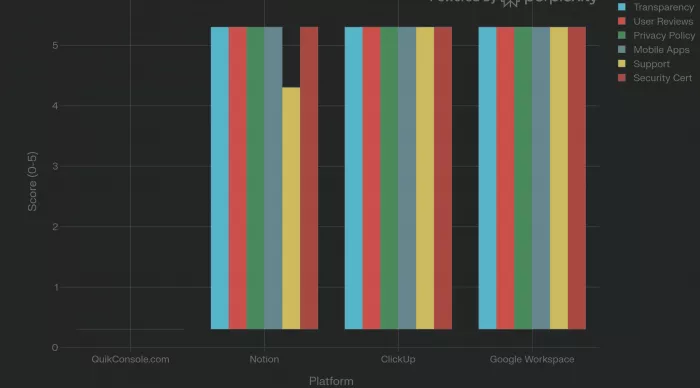
| Feature | QuikConsole | Notion | ClickUp | Google Workspace | Coda |
|---|---|---|---|---|---|
| Company Transparency | None | Full | Full | Absolute | Full |
| Verified Reviews | Zero | 4,800+ | 8,900+ | 42,000+ | 400+ |
| Privacy Policy | Missing | Published | Published | Published | Published |
| Free Tier | Unknown | Yes | Yes | Yes | Yes |
| Security Certification | Unverified | SOC 2 II | SOC 2 II | ISO 27001 | SOC 2 II |
| Mobile Apps | Not found | Yes | Yes | Yes | Yes |
| Customer Support | None visible | Yes | 24/7 | 24/7 | Yes |
Gaming Console Management: Use Official Apps
Third-party console tools are unnecessary and risky. Official apps provide comprehensive management with guaranteed security.
Xbox App offers remote control, game installation, party chat, achievement tracking, and gameplay streaming. Free.
PlayStation App provides Store browsing, remote purchasing, download management, trophy viewing, and Remote Play. Free.
Nintendo Switch Online App offers voice chat, game-specific features, and membership management. Free with subscription.
| Feature | QuikConsole Claims | Xbox App | PlayStation App | Nintendo App |
|---|---|---|---|---|
| Cost | Unknown | Free | Free | Free |
| Storage Management | Claimed | Available | Available | Available |
| Remote Control | Claimed | Available | Available | Limited |
| Security | Unverified | Microsoft | Sony | Nintendo |
| App Store Reviews | Zero | 500K+ | 400K+ | 100K+ |
Console manufacturers do not offer temperature monitoring because modern consoles manage thermal performance automatically. Third-party temperature monitoring claims require unauthorized system access and should be viewed with skepticism.
How to Verify Any Platform
Check software directories. Search G2, Capterra, Product Hunt, and Trustpilot. Absence from all directories is a major red flag.
Search for real users. Use "site:reddit.com [platform name]" and search YouTube for independent reviews. No organic community despite high search volume indicates artificial interest.
Review legal documentation. Legitimate platforms always publish privacy policies and terms of service before user registration.
Verify company information. Look for founder names, physical address, company registration, and multiple contact methods.
Red flags that should stop you immediately: Missing privacy policy. Zero directory presence. No company ownership information. Website content unrelated to claimed purpose. No user community despite high search volume. Contradictory functionality claims.
If You Already Used QuikConsole.com
Change passwords on any accounts sharing credentials used during QuikConsole registration. Use a password manager for unique passwords.
Monitor finances for unauthorized transactions if payment information was provided. Consider credit bureau fraud alerts.
Enable two-factor authentication on email, financial, and social media accounts.
Revoke connected permissions granted through OAuth on Google, Microsoft, and Apple accounts.
Scan devices for malware. Clear browser cookies and cached data from the usage period.
Report the platform to the FTC at reportfraud.ftc.gov and the FBI IC3 at ic3.gov.
Frequently Asked Questions
Is QuikConsole.com a scam?
While definitive scam classification requires proven fraud evidence, the platform exhibits verification failures across every standard trust signal. Users should avoid it until fundamental transparency requirements are met.
Is QuikConsole.com safe?
It cannot be considered safe. Missing security documentation, absent privacy policy, and unverifiable data practices create risks including potential data harvesting and credential exposure.
Who owns QuikConsole.com?
Unknown. Ownership information is completely unavailable through standard verification methods.
What are the best alternatives?
For productivity: Notion, ClickUp, Google Workspace, or Coda. For gaming console management: Xbox, PlayStation, or Nintendo official apps. All provide transparent operations, verified users, and documented security.
Why are there so many articles about it?
The search results consist entirely of affiliate review sites rather than official presence or user communities, indicating artificial content creation to capture search traffic.
Is it just new or actually suspicious?
Even newly launched platforms show founder visibility, beta testimonials, and basic legal documentation. QuikConsole's contradictory claims, ownership opacity, and unrelated website content go beyond typical new product patterns.
Should I trust it with my data?
No. Do not provide personal information, credentials, or sensitive data to QuikConsole under any circumstances.
Final Verdict
QuikConsole.com fails every standard legitimacy check. Missing legal documentation, absent company information, zero directory presence, no user community, and website content completely unrelated to claimed functionality make it impossible to recommend.
Proven alternatives exist for every function QuikConsole claims. Notion, ClickUp, Google Workspace, and Coda serve productivity needs with transparent operations and millions of verified users. Xbox, PlayStation, and Nintendo official apps handle console management with first-party security guarantees.
Until QuikConsole publishes a privacy policy, discloses company ownership, establishes software directory presence, and aligns its website content with claimed functionality, users should choose the verified alternatives documented above.
Compiled from publicly available data, direct website analysis, software directory searches, and community research. QuikConsole.com was not involved in this review. Information verified as of 2026.

Comments