NoteGPT Review 2026: The All-in-One AI Learning Assistant Explained

Rajat Chauhan
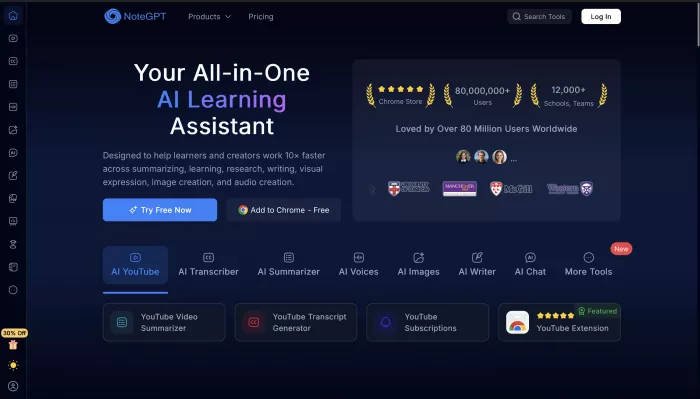
Table of Contents
- What Is NoteGPT, Really?
- How It Actually Works in Daily Use
- Core Features That Actually Move the Needle
- Pricing & Quotas – The Honest Breakdown (2026)
- Who Actually Gets the Most Value
- NoteGPT vs. The Popular Alternatives (2026)
- Accuracy & Limitations – What the Marketing Doesn’t Say
- Privacy & Data Safety
- Verdict – Should You Use NoteGPT in 2026?
- Frequently Asked Questions
Most people who type “notegpt” into Google are either already sold on the idea of an AI study tool and just need the real login link, or they’re exhausted from hour-long lecture videos and 200-page PDFs and want to know if this one actually works.
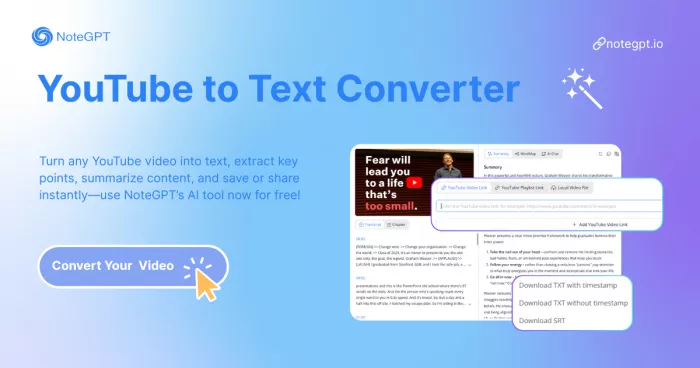
NoteGPT (official site: notegpt.io) is the multi-format AI workspace that turns YouTube videos, PDFs, web articles, audio files, PPTs, and even images into summaries, transcripts, mind maps, flashcards, slides, and podcasts. It is built primarily for students and self-learners who spend hours consuming content and need to cut that time dramatically without losing understanding.
What Is NoteGPT, Really?
NoteGPT is not another generic ChatGPT wrapper. It is a content-first workspace that ingests almost any long-form material and gives you structured, study-ready outputs plus an AI chat layer that lets you interrogate the source directly.
The company behind it is ZINGDECK INTL PTE. LTD., the same entity listed on the App Store, Play Store, and Trustpilot. The canonical product lives at notegpt.io (web app + workspace). The Chrome extension and mobile apps all feed into this same account.
Quick clarification on the confusion you’ll see in search results:
- notegpt.io → The real, full-featured workspace (this is the one 99% of users want).
- notegpt.com → An older, lighter version, mostly a landing page now.
- ScreenApp’s “NoteGPT” feature → A completely different product; ignore it if you want study tools.
How It Actually Works in Daily Use
You give it content in four main ways:
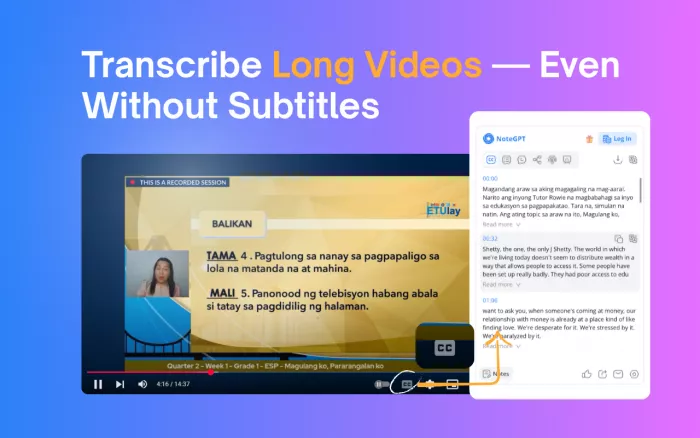
- Paste a YouTube link (works even on videos without subtitles/captions).
- Upload files (PDF, eBook, PPT, Word, images) or paste long text.
- Use the Chrome extension sidebar on any web page or online PDF.
- Record or upload audio (podcasts, lectures, meetings).
It then runs everything through top-tier models (GPT-4o, Claude 3.5, or Gemini) and spits out your choice of:
- Transcript + timestamped summary.
- AI Notes (key points + one-sentence takeaways).
- Mind Map (clickable, exportable to PNG/PDF).
- Flashcards (Anki-ready with spaced repetition tags).
- Slide deck drafts or AI Podcasts.
The real magic most reviews miss: Every piece of content you process stays in your personal library. You can chat with it indefinitely—e.g., “Explain the third law from this physics lecture in simple terms” or “Turn chapter 7 into bullet points for my exam.”
Core Features That Actually Move the Needle
YouTube & Lecture Workflow (The Killer Use Case)
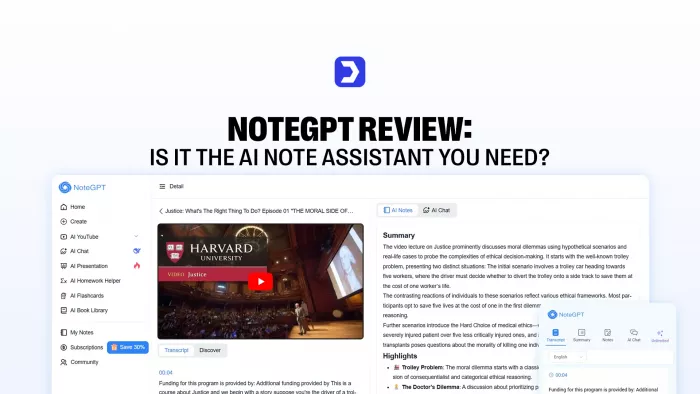
Paste any YouTube link → get a transcript + summary in under 20 seconds. Even 4-hour unscripted podcasts work surprisingly well. Batch processing (up to 20 videos at once) is available on paid plans.
- Real result: Students routinely report cutting a 3-hour lecture down to 15–20 minutes of active study time.
PDF & Research Paper Workflow
Upload a 150-page textbook or research paper and get layered summaries (short, medium, detailed), a clickable mind map, and an AI chat that answers questions with citations back to page numbers. This alone beats most dedicated PDF tools for students.
Chrome Extension – The “Always-On” Assistant
This is the feature users end up using most. It lives as a sidebar on every web page and online PDF. Highlight text to ask questions, get a summary, generate flashcards, or translate. It’s faster than copying into ChatGPT and preserves context perfectly.
Mind Maps & Flashcards
One-click mind maps are genuinely beautiful and export to PNG, PDF, or editable formats. Flashcards export directly to Anki. Educators tell me this feature is the single reason they pay for Pro.
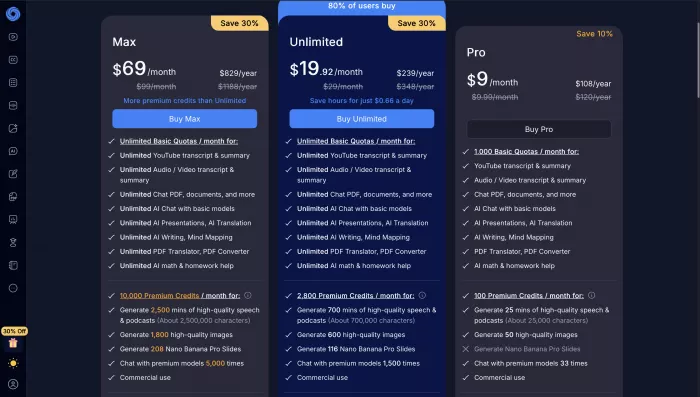
Pricing & Quotas – The Honest Breakdown (2026)
Free Tier: You get roughly 15 “credits” per month (about 15 standard summaries or 5–6 long videos). Enough to fall in love, not enough for daily heavy use.
Paid Plans (Estimates for 2026):
- Pro (≈ $9–12/month): 300 credits/month + batch processing + premium models.
- Unlimited (≈ $19.92/month): Truly unlimited + fastest processing + priority support.
IMPORTANT: How Credits are Consumed
Credits are consumed differently by task complexity. This is often not clear on the pricing page:
- Short YouTube video summary = 1 credit
- 2-hour video with mind map + flashcards = 4–6 credits
- Long PDF (200+ pages) with slide generation = 8–12 credits
Most full-time students end up on Pro; heavy researchers or professionals doing 10+ hours of content weekly go Unlimited.
Who Actually Gets the Most Value
- Students (The Sweet Spot): If you watch YouTube lectures or read textbooks, NoteGPT is borderline unfair. The active recall tools (flashcards/mind maps) improve retention significantly.
- Educators & Researchers: Great for fast literature reviews, creating slide decks from papers, and generating quiz questions from readings.
- Content Creators: Best-in-class for repurposing long videos into scripts, tweets, or blog posts.
- Professionals: Good for digesting long reports/earnings calls, but less ideal for live client meetings (use Jamieor Otter instead).
NoteGPT vs. The Popular Alternatives (2026)
| Tool | Best For | Study Tools Depth | Live Meetings? | Free Tier | Price (approx) |
|---|---|---|---|---|---|
| NoteGPT | Learning & Research | Excellent | Weak | 15 credits | $9–35/mo |
| Jamie | Live meetings & notes | Basic | Excellent | Decent | $24–99/mo |
| MeetGeek | Meeting transcription | Weak | Excellent | Decent | $15–59/mo |
| Eightify | Pure YouTube summaries | Basic | No | Generous | Free–$10/mo |
| PDFGPT | Academic PDFs only | Good | No | Limited | $5–20/mo |
The Reality: If your main pain is YouTube + PDFs + Active Study, NoteGPT wins. If your pain is Live Meetings, pick Jamie. If you only need YouTube summaries, Eightify is cheaper.
Accuracy & Limitations – What the Marketing Doesn’t Say
NoteGPT is excellent on structured educational content (lectures, textbooks, MOOCs). However:
- Nuance: It struggles with heavy sarcasm, thick accents, or highly mathematical derivations.
- AI Detection: While NoteGPT offers "rewriting" tools, do not rely on it to bypass AI detectors like Turnitin. Use it to understand concepts, not to write your essays for you.
- Fidelity: Always spot-check technical details or legal documents. Summaries are accelerators, not perfect substitutes for deep reading.
Privacy & Data Safety
Official policy states: Your content is not used to train models and is not sold. Data is encrypted at rest and in transit.
- For Students/Pros: It is reasonably safe and claims ISO 27001/SOC 2 compliance.
- For Enterprise: Unlike tools like Jamie or Fireflies, full GDPR documentation (DPA, sub-processor lists) isn't as transparently posted. For highly sensitive/regulated client data, request their DPA first.
Verdict – Should You Use NoteGPT in 2026?
YES, if:
- You are a student drowning in video lectures and textbooks.
- You want one tool for YouTube, PDFs, and active recall (Mind Maps/Flashcards).
- You value study efficiency over perfect design polish.
NO, if:
- Your primary need is live meeting transcription (Get Jamie).
- You only need basic YouTube summaries (Get Eightify—it's cheaper/free).
- You are looking for a tool to auto-write essays that bypass detection (It won't work reliably).
Bottom Line: NoteGPT is currently the best all-in-one AI learning copilot. The combination of multi-format support, an excellent Chrome extension, and genuine study tools makes it stickier than any single-purpose competitor.
Start here → https://notegpt.io (Pro tip: Install the Chrome extension first – that’s where most people get hooked).
Frequently Asked Questions
Q: Is NoteGPT free?
A: The free tier gives ~15 credits/month. It's enough to test the workflow, but paid plans ($9–12/mo) are required for serious daily use.
Q: Is NoteGPT better than ChatGPT for studying?
A: Yes, for content ingestion. NoteGPT handles large files, videos, and creates structured outputs (Mind Maps/Flashcards) instantly, whereas ChatGPT requires a lot of copying, pasting, and prompting to achieve the same result.
Q: Can NoteGPT handle long videos?
A: Yes, up to 4+ hours work fine on paid plans.
Q: Does NoteGPT have a mobile app?
A: Yes, iOS and Android apps exist and sync with your web account.
Q: Can I export notes to Notion or Obsidian?
A: Yes. You can export to Markdown, PDF, PNG, and Anki packages.
Q: How do I cancel?
A: Go to Avatar → Billing → Cancel Subscription. It reverts to the free tier at the end of the billing cycle.

Comments