Lithium Battery Shipping Compliance for IT Teams (What Your Carrier Won’t Explain)

Parveen Verma
Table of Contents
- Why IT Teams Are Suddenly Compliance Teams
- UN3481 basics for laptops and why SOC limits matter
- What UN3481 actually means
- Why SOC (State of Charge) is critical
- What carriers won’t tell you
- How to manage SOC properly
- Section II vs Fully Regulated Shipments
- Packaging, labels, and documentation checklist
- The biggest hidden rule
- Internal packaging requirements
- Mandatory labels
- When a Class 9 hazard label is required
- Documentation checklist
- Common failure points: carrier rejection, returns, delays
- How to design a compliant replacement workflow
- The typical (non-compliant) workflow
- A compliant workflow
- Creating a “Ready-to-Ship” kit
- Train your help desk
- Vendor requirements: who provides compliant packaging
- What suppliers should provide
- Ask vendors these questions
- Working with refurbishers and repair centers
- Who can provide compliant packaging?
- The Hidden Cost of Non-Compliance
- Final Practical Tips
- What Your Carrier Assumes You Already Know
- Closing Thoughts
Modern IT teams don’t just manage devices anymore.
They manage logistics, risk, and regulatory exposure.
The moment your company starts deploying, replacing, or repairing laptops across offices, you unknowingly step into the world of dangerous goods shipping. And lithium batteries — inside almost every laptop — are the reason.
Most carriers will accept your shipment.
Few will explain why a similar shipment next week gets rejected, returned, or stuck in customs.
This guide breaks down what actually happens behind the scenes — the details your shipping provider assumes you already know.
Why IT Teams Are Suddenly Compliance Teams
Ten years ago, IT shipping meant packing a laptop and printing a label.
Today:
● A laptop is a regulated hazardous material in air transport
● Mistakes can trigger fines
● Carriers can suspend accounts
● Customs can destroy shipments
● Insurance may not cover incidents
The biggest shock for most IT managers:
The problem is not the laptop.
The problem is the battery inside it.
Lithium-ion batteries are classified as dangerous goods because damaged or improperly packed cells can ignite in flight. Aircraft fires involving lithium batteries have already happened — and regulations were written after real incidents.
So every laptop shipment is regulated whether you realize it or not.
UN3481 basics for laptops and why SOC limits matter
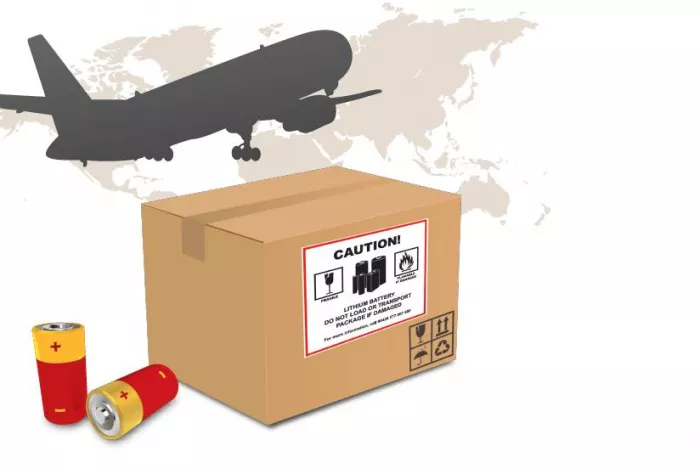
The classification that applies to almost every corporate laptop shipment is:
UN3481 – Lithium ion batteries contained in equipment
This is the code that customs officers, airlines, and hazardous goods inspectors use to decide if your shipment is compliant.
What UN3481 actually means
UN3481 covers:
● Laptops
● Tablets
● Workstations
● Mobile work devices
● Dockable engineering machines
It specifically refers to batteries installed inside the equipment, not spare batteries in a box.
Important distinction:
| Classification | Meaning |
| UN3480 | Batteries shipped alone |
| UN3481 | Batteries inside devices (laptops) |
Shipping under the wrong code is one of the most common IT compliance failures.
Why SOC (State of Charge) is critical
Most IT teams have never heard of SOC limits — but airlines care about it deeply.
For air transport:
Lithium-ion batteries must be at 30% charge or less (≤30% SOC).
Why?
Higher charge = higher thermal runaway risk.
A fully charged battery:
● generates more heat
● burns longer
● is harder to extinguish
What carriers won’t tell you
They assume the manufacturer already set the device correctly.
But replacement laptops from suppliers often arrive at 60–80% charge.
So when your IT team immediately reships a device to a remote employee, you may unknowingly violate air transport regulations.
How to manage SOC properly
IT departments need a process:
Before shipping a laptop internationally:
1. Power on device
2. Enter BIOS or OS battery settings
3. Drain battery to 25–30%
4. Shut down (not sleep mode)
5. Prevent auto-boot in transit
Yes — you actually need to turn the laptop on before shipping it.
This single step prevents:
● airline rejection
● customs inspection delays
● safety violations
It also dramatically reduces international procurement challenges when deploying equipment to overseas staff.
Section II vs Fully Regulated Shipments
Not all UN3481 shipments are equal.
There are two major categories:
Section II (simplified)
● Small quantity
● No Shipper’s Declaration required
● Most IT shipments fall here
Fully regulated (IA/IB)
● Bulk shipments
● Pallets
● Large deployments
● Dangerous Goods documentation required
Many companies accidentally cross into fully regulated territory when rolling out 30–50 laptops at once.
The carrier rarely warns you — they just reject the cargo at the airport.
Packaging, labels, and documentation checklist
Compliance is not paperwork alone.
It is a combination of packaging, marking, and documentation.
A box that looks professional can still be illegal to ship.
Packaging requirements
You cannot use ordinary packaging materials.
A compliant laptop package must include:
● Rigid outer box (corrugated tested)
● Inner cushioning preventing movement
● Protection from accidental activation
● Impact resistance
● No pressure on power button
Devices must not move inside the box.
Even a few centimeters of movement during turbulence can:
● damage the battery
● trigger inspection
● invalidate compliance
The biggest hidden rule
Original manufacturer packaging is compliant.
Random foam and bubble wrap are not.
This is why refurbishers and IT departments experience shipping issues when reusing generic boxes.
Internal packaging requirements
Inside the box:
● Screen protected
● Device immobilized
● Accessories separated
● Charger wrapped independently
Chargers cannot press against the laptop battery compartment.
Mandatory labels
For most IT shipments (Section II), you must apply:
Lithium Battery Mark
It must include:
● UN3481 number
● emergency contact phone number
The label must be visible and unobstructed.
What most teams do wrong:
They print a small version from Google Images.
Airlines reject these immediately.
The label has strict size and color requirements.
When a Class 9 hazard label is required
You need a Class 9 Lithium Battery Hazard Label if:
● shipping large quantities
● shipping via freight forwarder pallets
● shipping bulk replacements
● exceeding Section II limits
This is where many corporate rollouts fail.
Documentation checklist
Your shipment may require:
Always (minimum):
● Commercial invoice
● Packing list
● Correct UN statement on invoice
Sometimes:
● Air Waybill declaration
● Lithium battery statement
● MSDS or SDS (for some customs authorities)
Fully regulated shipments:
● Shipper’s Declaration for Dangerous Goods (DGD)
● Certified DG trained signatory
Important:
Only trained staff may legally sign a DGD.
An IT technician signing one can invalidate insurance coverage.
Common failure points: carrier rejection, returns, delays
Most IT teams think delays are random.
They are not.
They are predictable and usually compliance-related.
Here are the top reasons shipments fail.
1. Missing or incorrect lithium label
The most common rejection worldwide.
Symptoms:
● Shipment accepted locally
● Rejected at airline cargo terminal
● Returned to sender
Carriers often say: “Dangerous goods not declared.”
2. Battery charge too high
Airlines sometimes inspect shipments with scanners.
If SOC exceeds limits:
● cargo removed from aircraft
● shipment held for investigation
Your IT department may never hear the real reason.
You just see a 10-day delay.
3. Incorrect documentation wording
Commercial invoices must reference:
“UN3481 Lithium ion batteries contained in equipment.”
Writing “electronics” or “computer parts” is a common mistake.
Customs may flag the shipment for concealment.
4. Bulk shipments crossing thresholds
Example:
Shipping 2 laptops: compliant.
Shipping 25 laptops: now dangerous goods cargo.
Many companies try to Ship laptops internationally in batches and unknowingly cross regulatory limits.
Result:
● airport warehouse hold
● expensive DG handling fees
● shipment cancellation
5. Reusing old boxes
Old packaging creates risk because:
● internal supports degrade
● impact protection fails
● labels missing
Airlines treat reused packaging as suspect.
6. No emergency contact phone number
The lithium battery mark must have a monitored phone number.
Not:
● HR office number
● receptionist
● voicemail
It must reach someone knowledgeable about the shipment.
This alone causes many returns.
How to design a compliant replacement workflow
The real problem for IT teams is not initial deployment.
It is device replacement.
Emergency replacements are where most compliance violations occur.
The typical (non-compliant) workflow
1. Employee reports laptop failure
2. IT pulls replacement from storage
3. Laptop boxed and couriered same day
This workflow violates at least three lithium transport rules.
A compliant workflow
You need a standardized process.
Step 1 — Device preparation
● Power on
● Reduce battery to ≤30%
● Disable auto-boot
● Shut down
Step 2 — Packaging verification
● Use OEM or certified packaging
● Install cushioning inserts
● Separate accessories
Step 3 — Labeling
● Apply lithium battery mark
● Add emergency contact
● Verify orientation arrows if required
Step 4 — Documentation
● Correct UN description on invoice
● Accurate HS code
● Country of origin
● Serial number listing (recommended)
Step 5 — Carrier selection
Not every courier accepts lithium batteries equally.
Some subcontract air transport to airlines with stricter screening.
Creating a “Ready-to-Ship” kit
Smart IT departments maintain a compliance station:
Keep stocked:
● pre-approved boxes
● printed lithium labels
● documentation templates
● battery discharge checklist
This turns emergency replacements into a repeatable process.
Train your help desk
Your help desk is often the first person to ship devices.
They need awareness of:
● SOC limits
● packaging rules
● documentation wording
A 30-minute training prevents expensive logistics failures.
Vendor requirements: who provides compliant packaging
One of the biggest misunderstandings:
Your courier is not responsible for compliance.
You are.
Carriers transport.
Shippers declare.
What suppliers should provide
When purchasing laptops, require vendors to supply:
● certified shipping cartons
● internal molded supports
● lithium battery compliance documentation
This should be written into procurement contracts.
Ask vendors these questions
Before purchase, confirm:
● Is packaging UN tested?
● Can it be reused for returns?
● Does it meet IATA PI 967?
● Are replacement inserts available?
Most IT teams never ask — and later pay for custom packaging.
Working with refurbishers and repair centers
Repair vendors often ship devices back incorrectly.
Common issues:
● wrong label
● no UN number
● batteries installed after repair without compliance check
Include shipping instructions in your vendor agreement.
Who can provide compliant packaging?
You have three sources:
1. Manufacturer (best option)
● Fully compliant
● Designed for device
● Lowest rejection rate
2. Dangerous goods packaging suppliers
● Provide certified boxes
● Costly but reliable
3. Freight forwarder DG service
● Useful for bulk deployments
● Necessary for large projects
Avoid generic office supply boxes.
They are the number one cause of lithium shipment failures.
The Hidden Cost of Non-Compliance
Companies rarely calculate this.
But a single rejected shipment can cost more than the laptop itself.
Hidden costs include:
● warehouse storage fees
● return air freight
● customs inspections
● lost employee productivity
● emergency replacement purchase
Repeated violations can also trigger:
● carrier account suspension
● DG audit
● regulatory penalties
Final Practical Tips
To simplify compliance, remember these rules:
Always:
● Drain battery to 30%
● Use rigid packaging
● Apply lithium battery label
● Include correct UN wording
Never:
● Ship fully charged laptops
● Use generic boxes
● Ship bulk devices without checking thresholds
● Let untrained staff sign DG paperwork
What Your Carrier Assumes You Already Know
Couriers operate under a legal principle:
The shipper certifies the goods.
When you hand over a package, you are declaring compliance — whether you understand the rules or not.
Carriers don’t explain regulations because:
● liability shifts to the shipper
● regulations are public
● training is considered your responsibility
This is why IT departments, not logistics teams, often become the accidental point of failure.
Closing Thoughts
Lithium battery shipping is no longer a niche logistics issue.
It is an operational IT responsibility.
Every remote hire, equipment replacement, and office deployment depends on safe, compliant device transport.
Once you understand UN3481 rules, SOC limits, packaging, and documentation, shipments stop feeling unpredictable.
They become controlled.
And when your process is correct:
● carriers stop rejecting boxes
● customs stops inspecting shipments
● employees receive laptops on time
The goal isn’t just compliance.
The goal is reliability.
A well-designed workflow turns laptop shipping from a recurring crisis into a predictable IT operation — exactly what modern global teams need.

Comments