Is Viggle AI Worth the Hype? Inside the User Experience

Trevor Hall
Viggle AI (often just called “Viggle”) is a generative AI video + motion-transfer platform built for one thing: turning a single photo (or character image) into a moving, meme-ready video usually by borrowing motion from a template clip or a reference video. Its “viral” identity is not accidental: the product is designed around remixing trends (dance clips, walkouts, sports celebrations, scene swaps) with minimal editing.
What kind of AI is Viggle?
Viggle sits in the AI video generation / AI animation category, but it’s not the same as “text-to-video cinematic generation” tools.
Think of it more like character animation + motion capture transfer:
● You provide a character image (you, a friend, a cartoon, a created persona).
● You pick a motion source (template clip / video).
● Viggle maps that motion onto your character to output a short video.
A lot of the “magic” comes from how well it preserves human body motion in a controllable way—this is also why it became a meme engine instead of a film tool.
What services does Viggle AI provide?
1) Photo-to-video animation (motion transfer)
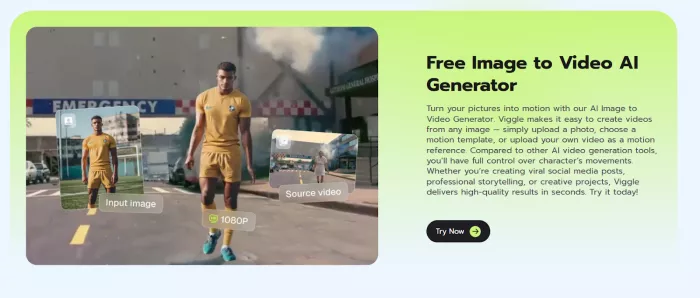
This is the core: animate a still image using motion from a clip or a preset template.
2) “Replace a person in a video with your photo” (Mix-style templates)
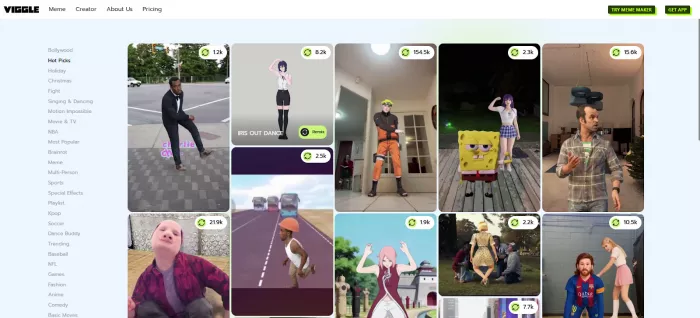
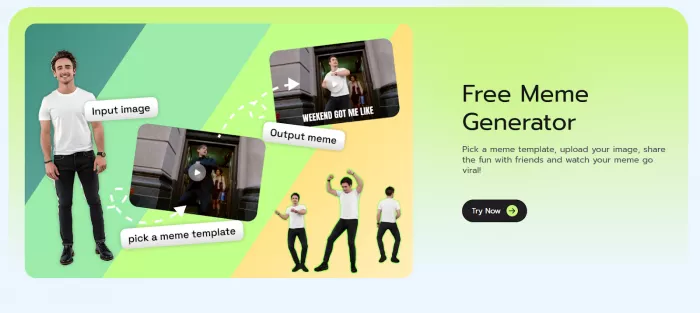
Viggle heavily promotes “drop your photo into a viral scene” workflows using a large template library.
3) Multi-character replacement (group scenes)
It also supports replacing multiple characters in a scene (useful for friend-group memes or re-casting a scene).
4) Lip-sync and voice/music-driven animation (Mic / Rap-style)
The mobile listing highlights features where a character can talk/sing/rap via typed text or recorded voice (lip-sync).
5) Real-time “become anyone” streaming (Viggle LIVE)
Viggle also markets a real-time character mode where your webcam performance drives the character—useful for short roleplay clips or livestreaming.
Key features (what actually matters in practice)
Here are the features that typically decide whether Viggle feels “worth it” for creators:
● Motion transfer quality: Strong at mapping body motion from a reference to a still character, which is what makes it meme-friendly.
● Template-driven workflow: A big catalog of meme templates lowers the skill barrier (you don’t need After Effects / CapCut expertise to start).
● Multi-subject scenes: Replacing multiple people can be a differentiator for group memes.
● Lip-sync (talk/sing/rap): Good for short punchline formats and “character voice” memes.
● Live mode (webcam-driven): This is a different use case—more VTuber-ish/roleplay-ish than “generate a clip.”
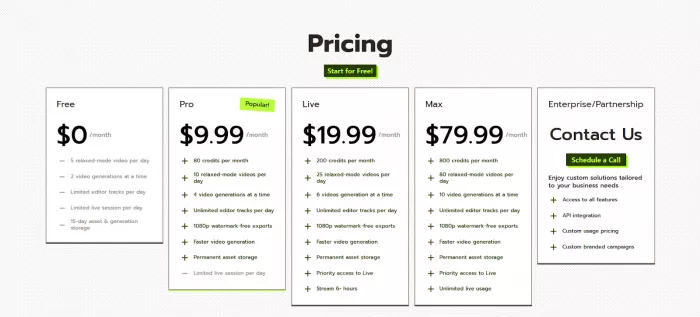
Pricing
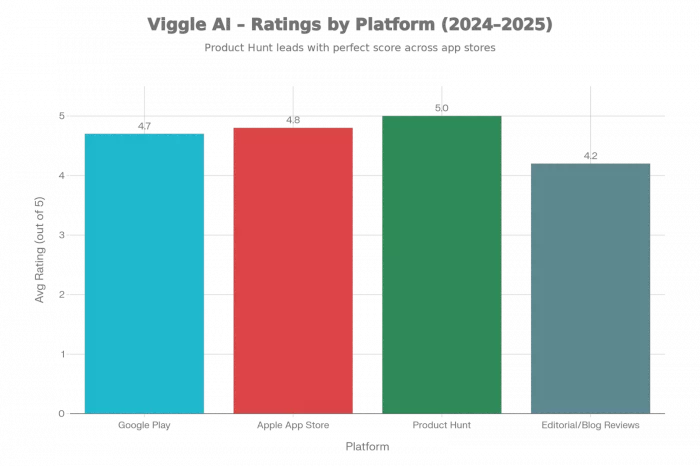
Ratings by Platform
| Platform | Avg Rating | #Reviews (used) |
| Google Play (Viggle AI: Meme Maker) | 4.7/5 overall; sampled reviews skew 3–5 stars | ≈119–121K total; a few detailed reviews sampled |
| Apple App Store (US) | 4.8/5 | Thousands (exact count not shown in snippet) |
| Product Hunt | 5.0/5 | 3 text reviews |
| Editorial/blog reviews | ~4.1–4.3 (derived from tone) | 4 articles |
| Reddit & communities | N/A (sentiment mix) | Dozens of comments across threads |
Rating Platform Snapshot
Top Praises
● Strong realism and motion quality: Users and reviewers highlight high realism, physics-aware motion transfer, and impressive facial tracking for both text/image-to-video and character replacement. reddit
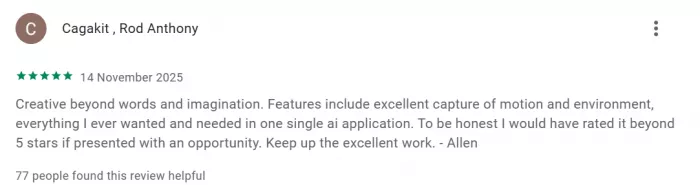
● Extremely fun and viral for memes: Described as “literally the most fun app” and “gateway to limitless creativity,” especially for TikTok-style memes, dance trends, and fandom content.
● Accessible for non-editors: Short, template-based workflow (Mix/Multi, templates, 3-minute flows) makes it easy for non-video editors to generate content quickly.
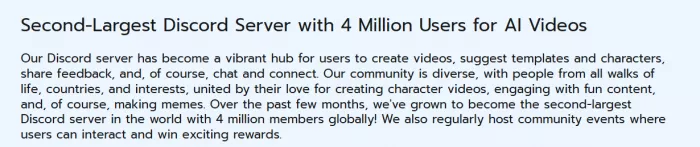
● Massive and active community: One of the largest AI Discord servers (≈4.2M+ members), with users sharing templates, prompts, and derivative works; fosters rapid experimentation and trend creation.
Top Complaints
● Limits and monetization friction: Free users frequently mention hard caps (e.g., ~5 generations/day), wait times, and credit systems that feel like “money grab” when combined with failed renders.
● Glitches, failed renders, and UX gaps: Reports of upload issues, buggy behavior, unexplained generation failures, and credits being deducted even when renders fail.
● Short clip length and watermarks: Multiple reviewers argue that current support for very short, watermarked clips limits use for longer-form content or professional projects without upgrading.
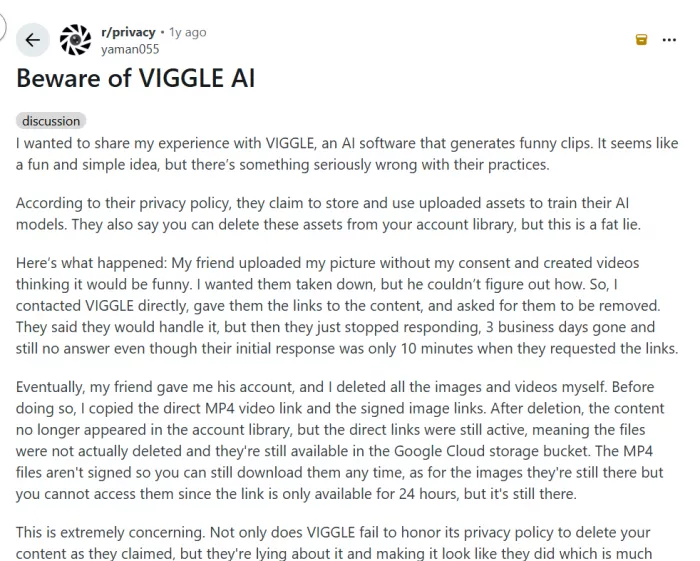
● Privacy, consent, and copyright concerns: At least one detailed post describes difficulties getting non-consensual content removed; others question legality of charging for downloads using copyrighted music or videos. reddit
● Discord/onboarding friction (for earlier versions): Tooling tied to Discord was seen as confusing and chaotic for beginners, though newer mobile and web apps reduce this dependency.
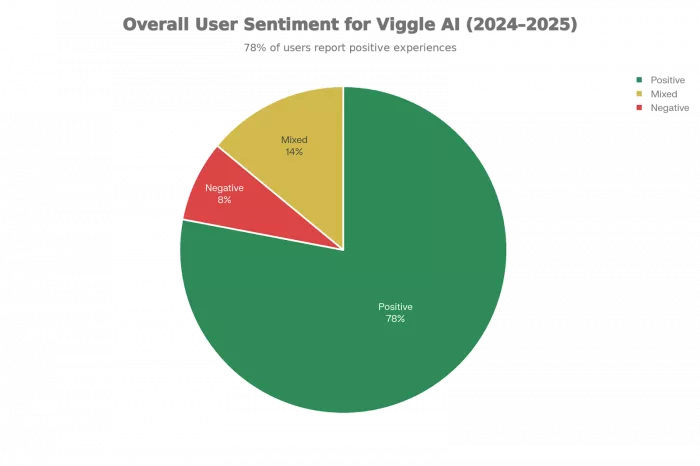
User Sentiment and Trend
Who Should / Shouldn’t Use It
Should Use Viggle AI
● Short-form creators and meme makers: Ideal for TikTok/Reels/YouTube Shorts creators who want fast, physics-aware character or self-insert animations for trends, dances, and fandom memes.
● Streamers and VTubers experimenting with avatars: The Live feature plus character control suits virtual cosplay, faceless streaming, and avatar-based meetings, especially for creators already comfortable with webcams and overlays.
● Non-technical users who value fun over precision: Templates, guided flows, and mobile apps make it accessible if the goal is fun viral content rather than pixel-perfect production.
Should Probably Look Elsewhere / Be Cautious
● Professional, long-form video producers: Current limitations around clip length, watermarks on free tiers, and occasional instability make it less suited as a primary tool for long-form, client-grade work unless you accept a hybrid workflow and paid credits.
● Users sensitive to strict free limits or credit systems: If daily caps and per-credit billing feel unacceptable, the reported 5‑ish free generations/day and credit loss on failures will be frustrating.
● Privacy- and copyright‑sensitive contexts: Because users can upload images and videos of others, and because there are open questions around downloads and copyrighted material, organizations with strict compliance requirements should review Viggle’s terms and privacy policy carefully and set clear internal policies.
Final Conclusion
Viggle AI has emerged as a high-impact, creator-first tool that excels at short-form, character-driven meme and motion content, backed by strong ratings across app stores and a massive, engaged community. Its strengths lie in realistic motion transfer, an ultra-fast template-led workflow, and a low barrier to entry that makes complex animation accessible to non-editors and social creators. At the same time, persistent pain points around app stability, strict free-tier limits, short clip length, watermarks, and occasional copyright or privacy concerns mean it is not yet a drop-in replacement for professional, cinematic-grade video tools.
For creators focused on TikTok, Reels, fan edits, and avatar-driven content, Viggle AI offers exceptional creative leverage relative to its cost and learning curve. For studios, brands with strict compliance needs, or filmmakers seeking fully photorealistic, long-form output, it is best treated as a powerful companion tool rather than the core production engine.

Comments