InSnoop: Anonymous Instagram Story Viewer — Does It Actually Work In 2026?

Rajat Chauhan
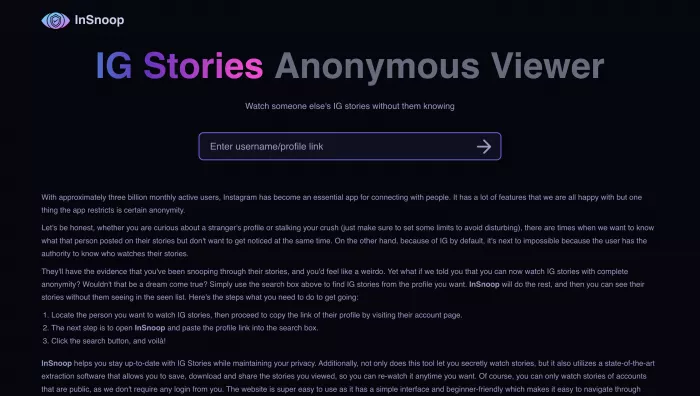
Every month, over 68,000 people search for InSnoop. They all want the same thing: a way to watch someone's Instagram story without their name showing up in the viewer list.
Maybe a friend told you about it. Maybe you saw it mentioned in a Reddit thread. Maybe you just need to check a competitor's stories without tipping them off. Whatever brought you here, you're probably wondering three things — does InSnoop actually work, is it safe, and will the person find out you looked?
I tested InSnoop myself, read through dozens of Reddit threads and user complaints, compared it against seven competing tools, and dug into every safety concern I could find. This is everything you need to know before you decide whether to use it.
What Is InSnoop?
InSnoop is a free, browser-based tool that lets you view and download Instagram Stories and Highlights from public accounts without logging into Instagram. No signup. No app. No payment. You type in a username, and if that account is public, you can watch their stories without your name ever appearing in their viewer list.
That's the pitch. The reality is mostly consistent with it — but there are caveats worth understanding before you rely on it.
Quick Facts
- Cost: Completely free — no premium tier, no hidden charges, no trials
- Login required: No — you never enter Instagram credentials
- App download: No — runs entirely in your web browser
- Devices: Desktop, mobile, tablet — anything with a browser and internet
- Downloads: Photos save as JPEG, videos as MP4
- Coverage: Stories and Highlights from public profiles only
- Private accounts: Not supported — no legitimate tool can bypass this
- Company info: Not publicly disclosed — no owner, address, or contact listed
- Website: insnoop.com
How InSnoop Works
The Technology Behind Anonymous Viewing
When you watch someone's story through Instagram's app, your account gets logged and your name appears in their viewer list. InSnoop works around this by fetching publicly available story data on your behalf without associating the view with any Instagram account.
Think of it like reading a news article through a cached Google result instead of visiting the newspaper's website directly. The content is the same, but the original site doesn't register your visit.
Because you never log into Instagram through InSnoop, there's no account to connect to the view. The story creator sees that their content was accessed, but your identity isn't attached.
Important limitation: This only works for public accounts. Private profiles, Close Friends stories, and disappearing DMs are completely inaccessible. No third-party tool can change that, and any site claiming otherwise is lying to you.
How to Use InSnoop
The process takes under a minute:
- Open any browser — Chrome, Safari, Firefox, Edge all work
- Go to insnoop.com — make sure you're on the official site, not a copycat
- Type the Instagram username into the search bar — leave out the @ symbol
- Click search — InSnoop fetches available stories and highlights
- Browse the results — tap or click on any story to view it full-size
- Download if needed — click the download button to save photos (JPEG) or videos (MP4)
No registration forms. No email verification. No captchas. No "create a free account to continue" popups.
What You Can and Cannot Do
| Action | Possible? | Details |
|---|---|---|
| View active stories anonymously | Yes | 24-hour content from public accounts |
| View saved highlights | Yes | Permanent collections on public profiles |
| Download story photos | Yes | Saves as JPEG |
| Download story videos | Yes | Saves as MP4 |
| See upload timestamps | Yes | Shows when each story was posted |
| View content from accounts that blocked you | Yes | Works if their profile is still public |
| View private accounts | No | Impossible for any third-party tool |
| View feed posts or reels | No | Stories and highlights only |
| Download in bulk | No | One story at a time |
| Get analytics or insights | No | No engagement data provided |
| Contact customer support | No | No support channels exist |
Is InSnoop Safe?
Safety isn't a single yes-or-no question here. It breaks into three separate concerns, and each has a different answer.
Will InSnoop Infect My Device?
Almost certainly not. InSnoop runs entirely in your browser with no software downloads, executable files, or plugin requirements. The site uses SSL encryption (HTTPS), meaning your connection to their server is encrypted.
I found no credible reports of malware, viruses, or malicious redirects from the official insnoop.com domain.
The real risk: Copycat sites using similar names. If you mistype the URL or follow a sketchy link from a search result, you could land on a phishing site or malware trap. Always verify you're on the official domain.
Will InSnoop Compromise My Instagram Account?
This is where InSnoop has a genuine structural advantage over some competitors: it never asks for your Instagram username or password. You never log in. There is no mechanism for InSnoop to access, compromise, or interact with your Instagram account in any way.
Tools that require your Instagram login credentials carry real risk. InSnoop sidesteps that entire category of danger by design.
Will Instagram Punish Me for Using It?
Instagram's Terms of Service prohibit accessing the platform through unauthorized third-party tools. InSnoop is, technically, an unauthorized third-party tool. A strict reading of the ToS means using it is a violation.
In practice, Instagram focuses enforcement on automated behavior — bots, mass scraping, coordinated inauthentic activity. There are no widely documented cases of individual users being banned specifically for viewing public stories through browser-based tools like InSnoop.
Since InSnoop doesn't require your login, Instagram has no straightforward way to connect your account to InSnoop usage. The risk is theoretical rather than practical, but it isn't zero, and Instagram regularly updates its detection methods.
What About Data Collection?
Here's where transparency becomes a problem. InSnoop provides:
- No formal privacy policy
- No terms of service document
- No disclosure about what data they collect
- No information about how searches or browsing activity might be stored or shared
The site claims it doesn't store user data, but without documentation, that claim can't be independently verified. You're trusting an anonymous service operator with your browsing activity.
Bottom line: Your Instagram account is safe because you never provide credentials. Your device is likely safe from malware. But you're placing faith in an unknown entity's data practices, which is a legitimate concern.
Is InSnoop Legit or a Scam?
Neither label fits perfectly. The truth sits in between.
Evidence It's Legitimate
- It works. You enter a username, public stories load, downloads function. The core product delivers.
- Independent coverage exists. TechRaisal published a neutral review with clear pros and cons. Movavi included it in their curated roundup of Instagram story viewers.
- No payment traps. It doesn't ask for credit cards, doesn't bait-and-switch with paywalls, doesn't force subscriptions.
- No credential theft. It never requests your Instagram login information.
- Significant user base. Over 140,000 monthly visitors and ranking for 3,700+ keywords suggests sustained, real usage — not a fly-by-night operation.
Evidence That Raises Concerns
- Zero company information. No business name, no address, no team page, no "About Us" section, no contact email. Nobody knows who built or maintains InSnoop.
- No customer support. If something breaks, there's nobody to contact. No email, no form, no chatbot, no help center.
- Reliability problems. Users frequently report "Server Unavailable" errors that can last hours.
- Anonymity isn't guaranteed. Reddit users have documented cases where their names still appeared in story viewer lists despite using InSnoop.
- No accountability. Without knowing who operates the service, there's no entity responsible for data handling, uptime, or user safety.
The Honest Assessment
InSnoop isn't a scam. It doesn't steal money or credentials. It performs a real function that real people find useful.
But "not a scam" is a low bar for trust. The complete absence of transparency about ownership, data practices, and accountability means you're making a bet every time you use it — a small bet, probably a safe one, but a bet without full information.
Use it with your eyes open. Don't depend on it for anything where failure has real consequences.
InSnoop Pros and Cons
| Advantages | Disadvantages |
|---|---|
| Completely free with no hidden costs | Frequent "Server Unavailable" errors |
| No signup, login, or account creation required | No company information or transparency about ownership |
| Simple one-step interface — just search a username | Anonymity not 100% guaranteed — failures documented |
| Downloads stories as standard JPEG and MP4 files | Only works for public Instagram accounts |
| Supports both Stories and saved Highlights | Violates Instagram's Terms of Service (gray area) |
| Works on any device with a browser | Zero customer support or help resources |
| SSL encryption for connection security | No formal privacy policy or data collection disclosure |
| No app installation — nothing on your device | No advanced features (no analytics, no bulk downloads) |
Real User Experiences
When It Works Well
Most users who share their experiences online report that InSnoop delivers on its core promise. Commonly reported positives include:
- Stories load quickly after entering a username
- Downloads work smoothly for both photos and videos
- No name appears in the story creator's viewer list
- Interface is simple enough to use without instructions
- Works reliably on mobile browsers
For straightforward, occasional use on public accounts, InSnoop gets the job done more often than not.
The Problems People Actually Report
User complaints cluster around three specific issues:
1. Server Downtime
"Server Unavailable" is the single most common complaint across Reddit threads and review sites. Users describe entering a username and getting an error message instead of stories. Sometimes it resolves in minutes, sometimes it lasts hours or longer.
This likely stems from a combination of high traffic volume, limited server capacity, and Instagram periodically blocking InSnoop's access methods.
2. Anonymity Failures
This is the most serious concern. A small but documented number of Reddit users report seeing their names appear in someone's story viewer list after using InSnoop — directly contradicting the tool's core promise.
Possible explanations include:
- Mixed viewing: If you also viewed the same story through Instagram's app (even days earlier), your name might already be cached in the viewer list
- Browser data leakage: Logged-in Instagram sessions in other tabs could theoretically create associations
- Technical glitches: No scraping tool operates with perfect reliability, and bugs happen
- Instagram updates: Instagram regularly changes how it handles third-party data access, potentially breaking anonymity mechanisms
These reports are a minority, but they exist. Pretending otherwise would be dishonest.
3. Content Not Loading
Some users report that searches return no results even for public accounts with active stories. This typically correlates with broader server issues or Instagram temporarily blocking InSnoop's access method.
What Other Reviews Say
- TechRaisal gave InSnoop a balanced review, praising the free access and simple interface while flagging reliability concerns and the lack of company transparency
- PrivateStoryViewer published a more critical assessment, documenting anonymity failure reports and trust concerns
- Movavi included InSnoop in their "Best Instagram Story Viewers" roundup alongside established tools like Inflact
InSnoop vs Alternatives
InSnoop is far from the only anonymous Instagram viewer available. Here's how it compares to the most common alternatives:
| Tool | Cost | Login? | Stories | Highlights | Downloads | Extras | Reliability | Best For |
|---|---|---|---|---|---|---|---|---|
| InSnoop | Free | No | Yes | Yes | Yes | None | Inconsistent | Zero-barrier casual viewing |
| Inflact | Freemium | Yes (full features) | Yes | Yes | Yes | Analytics, scheduling, hashtag tools | High | Professional marketers |
| StoriesIG | Free | No | Yes | Limited | Yes | None | Good | Reliable basic viewing |
| Pixwox | Free | No | Yes | Yes | Yes | Profile statistics | Moderate | Data-curious users |
| Insanony | Free | No | Yes | Limited | Yes | None | Moderate | Mobile-first simplicity |
| InstaNavigation | Free | No | Yes | Yes | Yes | Multilingual support | Moderate | Non-English speakers |
| Path Social | Free | No | Yes | Limited | Separate tool | Blocked account focus | Good | Viewing blocked accounts |
InSnoop vs Inflact
Inflact is the most feature-rich option in this category. Beyond story viewing, it offers hashtag research, post scheduling, analytics, and professional monitoring tools. The catch: full features require an account and a paid subscription. The free tier has meaningful limitations.
Pick InSnoop if: You want completely free access with zero friction for occasional use.
Pick Inflact if: You're a marketer or agency that needs reliable, professional-grade tools and doesn't mind paying.
InSnoop vs StoriesIG
StoriesIG offers the same free, no-login experience as InSnoop with reportedly better uptime. The interface is clean and functional. Highlight support is more limited, but for pure story viewing, StoriesIG is often the more reliable choice.
Pick InSnoop if: You specifically need robust Highlight access alongside Stories.
Pick StoriesIG if: Reliability matters more to you than Highlight depth.
InSnoop vs Pixwox
Pixwox adds basic profile statistics — follower counts, posting frequency — alongside story viewing. This gives you more context about the account you're viewing. The tradeoff is a busier interface and slower load times.
Pick InSnoop if: You want the simplest possible experience with nothing extra.
Pick Pixwox if: You want profile context alongside story viewing.
Which Tool Should You Actually Choose?
Here's a simple decision framework:
- Want free, instant access with zero setup? → Start with InSnoop, bookmark StoriesIG as backup
- Need professional features and consistent uptime? → Pay for Inflact
- InSnoop keeps going down? → Switch to StoriesIG or Insanony
- Want profile data alongside stories? → Try Pixwox
- Viewing from a blocked account? → InSnoop or Path Social both work for public profiles
- Need something that works every single time? → Rotate between 2-3 free tools instead of relying on one, or invest in Inflact
When to Use InSnoop (and When Not To)
Appropriate Use Cases
Professional monitoring: Your marketing team wants to track competitor story campaigns without appearing in their viewer list. InSnoop keeps your brand invisible.
Content research: You're a creator studying how other accounts structure their stories — timing, formats, visual style — without influencing their analytics.
Personal privacy: You want to view someone's public story without the social implications of showing up in their viewer list. That's a human need, and there's nothing wrong with it.
Saving disappearing content: Someone posted a useful recommendation, recipe, or travel tip in their story. You want to save it before the 24-hour window closes.
Uses That Cross a Line
Monitoring someone who blocked you (for the wrong reasons): If someone blocked you, they made a deliberate choice. Using tools to circumvent that boundary crosses from curiosity into disrespect — and depending on context, into harassment.
Obsessive checking: Repeatedly watching an ex-partner's or crush's stories through anonymous tools isn't harmless research. It's a pattern that isn't good for you or for them. The anonymity doesn't make the behavior healthy.
Content theft: Stories belong to whoever created them. Downloading for personal reference is one thing. Reposting, screenshotting for gossip accounts, or using someone's content commercially without permission is different entirely.
The bottom line: Anonymous viewing tools are ethically neutral. How you use them isn't. If you'd feel uncomfortable explaining your usage to the person whose stories you're viewing, that's a signal worth paying attention to.
Troubleshooting Common Problems
"Server Unavailable" Error
This is InSnoop's most frequent issue. Try these fixes in order:
- Wait 15-30 minutes and retry — server overload usually resolves on its own
- Clear your browser cache and cookies — cached data sometimes causes conflicts
- Switch browsers — try Firefox if Chrome isn't working, or vice versa
- Try mobile vs desktop — one may work when the other doesn't
- Check if Instagram itself is down — sometimes the problem is upstream, not InSnoop
- Use an alternative tool — if InSnoop has been down for more than an hour, switch to StoriesIG or Insanony
Stories Not Loading
If the site is accessible but specific stories won't display:
- Verify the account is public — the owner may have recently switched to private
- Check that active stories exist — stories expire after 24 hours
- Try Highlights instead — even if current stories have issues, saved Highlights may still load
- Re-enter the username carefully — one wrong character fails the search
- Test with a different username — this tells you whether it's a general problem or specific to that account
Download Failures
If the download button isn't working:
- Right-click and "Save As" — bypass InSnoop's download button entirely
- Check browser download settings — some browsers block automatic downloads from third-party sites
- Temporarily disable your ad blocker — some ad blockers interfere with download functionality
- Try a different device — mobile and desktop handle downloads differently
Name Appearing in Viewer List
If your name showed up despite using InSnoop:
- Check whether you also viewed through Instagram — mixed viewing (app + InSnoop) is the most likely cause
- Clear your Instagram app cache — old viewing data can persist
- Check for logged-in Instagram sessions — having Instagram open in another browser tab could create associations
- Accept the possibility of a glitch — InSnoop's anonymity isn't guaranteed 100% of the time
When to Abandon InSnoop and Switch
Move to an alternative if:
- You get server errors more than half the time you try
- Your name has appeared in viewer lists after using InSnoop
- Stories consistently fail to load even when the site is accessible
- You need reliable access for professional or time-sensitive work
Frequently Asked Questions
Is InSnoop free?
Yes. Completely free with no subscription, no premium tier, no trial period, and no hidden charges. You never enter payment information.
Does InSnoop work for private Instagram accounts?
No. InSnoop only accesses publicly available content. No legitimate third-party tool can view private accounts — any site claiming otherwise is misleading you.
Is InSnoop really anonymous?
For most users, yes. Your name typically won't appear in the story viewer list because you never log into Instagram through the tool. However, there are documented cases of anonymity failures, so "very likely anonymous" is more accurate than "guaranteed anonymous."
Can I get banned from Instagram for using InSnoop?
No confirmed cases exist. Since InSnoop doesn't require your Instagram login, Instagram has no direct way to link your account to InSnoop activity. The risk is very low but theoretically non-zero.
Is using InSnoop legal?
Viewing publicly available content is generally legal in most jurisdictions. However, it violates Instagram's Terms of Service, and downloading content to republish without permission may infringe copyright. This is a gray area, not a clear-cut answer.
Does InSnoop require me to log in to Instagram?
No. You never provide Instagram credentials. This is one of InSnoop's main safety advantages.
Why does InSnoop keep showing "Server Unavailable"?
High traffic, limited server capacity, or Instagram temporarily blocking InSnoop's access method. Wait 15-30 minutes and retry, or switch to an alternative like StoriesIG.
Does InSnoop save my search history?
InSnoop claims it doesn't store user data, but no formal privacy policy exists to verify this. Your browser will record the visit unless you use incognito/private browsing mode.
Can I view stories from someone who blocked me?
Yes, if their account is still public. Instagram's block prevents direct interaction through the app but doesn't make a public profile invisible to third-party tools.
What formats does InSnoop download?
Photos save as JPEG, videos as MP4. Both are standard formats that open on any device without special software.
Does InSnoop work on iPhone and Android?
Yes. It works in any mobile browser — Safari, Chrome, Firefox — on both iOS and Android. No app installation needed.
Is InSnoop an app I need to download?
No. InSnoop is entirely browser-based. Be cautious of any app in the App Store or Google Play claiming to be InSnoop — those aren't official and could be unsafe.
How does InSnoop compare to Inflact?
InSnoop is completely free with no signup. Inflact offers more professional features (analytics, scheduling) but requires an account and paid subscription for full access. InSnoop is better for casual use; Inflact is better for professional work.
Who owns InSnoop?
Unknown. No company name, physical address, or team information is publicly available. This lack of transparency is the tool's most significant trust concern.
What are the best InSnoop alternatives?
StoriesIG (most reliable free alternative), Inflact (best professional option), Pixwox (adds profile statistics), Insanony (clean mobile experience), and InstaNavigation (multilingual support). Bookmark at least two so you always have a backup.
Final Verdict
InSnoop works for what it promises — when it works.
For casual, no-stakes anonymous story viewing, it removes every barrier: no account, no cost, no installation, no complexity. When the servers cooperate, the experience is fast, simple, and effective.
But the caveats are real:
- Reliability is inconsistent. "Server Unavailable" errors are common enough that you need backup tools bookmarked.
- Anonymity isn't bulletproof. Most users stay invisible, but documented failures exist. If being caught would have serious consequences, no third-party tool can guarantee 100% anonymity.
- Nobody knows who runs it. The complete absence of company information, support channels, and privacy documentation means you're trusting an unknown entity every time you use it.
- Instagram's terms of service don't approve. You probably won't face consequences, but you should know you're in a gray area.
What I Recommend
For occasional personal use: InSnoop is fine. Bookmark it alongside StoriesIG so you always have a working option when one goes down.
For professional work: Skip InSnoop. Invest in Inflact or a dedicated social listening platform where reliability and accountability actually exist.
For everyone: Remember that anonymous doesn't mean consequence-free. View public content respectfully. Don't use privacy tools to cross boundaries that someone set for a reason.

Comments