How to Create a New Email Account Safely: Setup Checklist (MFA, Recovery, Aliases)

Preeti
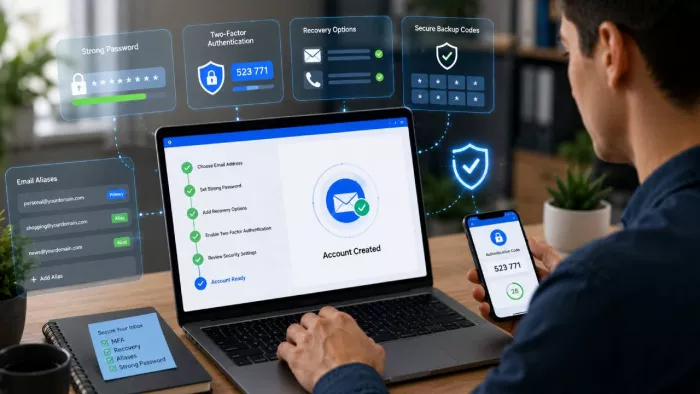
Table of Contents
- Before You Create a New Email Account: Pick the Right Provider
- Step-by-Step: How to Create a New Email Account Safely
- Email Security Checklist: 5 Settings to Turn On Immediately
- Why Recovery Setup Is Just as Important as Password Setup
- How Email Aliases Make a New Email Account Safer
- Common Mistakes People Make When They Create a New Email Account
- After Setup: The First 10 Minutes of Inbox Hardening
- Choosing a Provider That Supports Safer Setup by Design
- Conclusion: A New Email Account Is Only Safe If the Setup Is
When you set up a new email account, the first setup options you choose will affect the security of that account over time. Many people treat signing up for a new account like a minor task. However, security mistakes, such as weak recovery options or authentication, can remain invisible for months.
Email has become the foundation of online identity. It links to financial services, work applications, online shopping accounts, password recovery emails, and much more. This means that a single insecure email account has the potential to compromise much more than a single communication channel. Secure email account security begins long before the first email is ever sent.
That is why this guide focuses on safe setup, not just account creation. The goal is to help you build a secure foundation from the start. Instead of stopping at username and password, this checklist covers the settings and habits that reduce real risk. When setup is handled carefully on day one, the account becomes much easier to protect over time.
Before You Create a New Email Account: Pick the Right Provider
Before moving on to learn how to create a new email account, it is worthwhile to take your time and select the right email service provider. Many security issues actually occur before completing the email account creation process. Impersonating landing pages, deceptive ads, and fake login pages may lead individuals to provide their details on incorrect websites. Therefore, it is recommended to only sign up from the email service provider’s website or app.
Provider choice also plays a role in long-term account protection. Most mainstream platforms tend to prioritize ease of use, broad integrations, and simplified recovery flows. By contrast, a secure email service may place greater emphasis on stronger authentication, alias support, reduced provider-side visibility, and additional privacy controls. Neither approach is universally better than the other. The right choice ultimately depends on how you expect to use your inbox and the level of security or privacy you want to maintain over time.
Before you proceed with the signup process, it is also a good idea to compare a few practical considerations. For example, you may want to compare the reputation of the provider, as well as the domain’s overall legitimacy, before you proceed with creating your account. It is also a good idea to compare the security options available as soon as you create your account, especially in terms of email authentication security, as well as overall recovery options, alias options, as well as phone verification options.
Overall, creating a safe account begins with a provider you can trust.
Step-by-Step: How to Create a New Email Account Safely
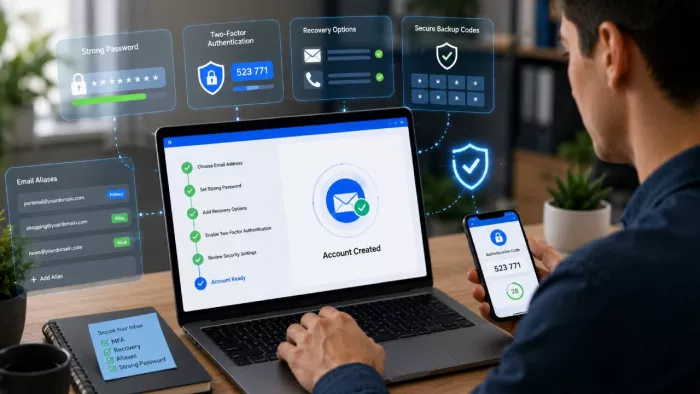
A secure setup process should provide security before the inbox is even active. When setting up a new email account, every initial setting impacts personal privacy, security, and future usability. It is therefore beneficial to have an organized setup process instead of rushing through the process.
Choose Your Address Carefully
It is not obvious that an email address may share more than one expects. It is not advisable to include full birth years, home addresses, and any personal information in the email address. Although this information may not seem risky, it may provide an easier way for identity correlation.
It is better to have a simple format for an email address. If it is for personal use, it should be simple and easy to remember. If it is for work use, it should have a professional format that is not too revealing of personal information. If possible, the email address should be simple and easy to type.
If the email is for multiple uses, consider having different email addresses later instead of including all the uses in the initial setup.
Create a Strong Password Immediately
A good password is one of the first lines of defense for your email inbox. The best way to ensure your email account is secure is to use a password manager to come up with a long and unique password.
Avoid using passwords from your old accounts, as this might mean your new account gets compromised right away, considering that your other account might already be compromised. Also, avoid using words that are easy to guess, such as keyboard sequences and personal references.
People often ask how to create a new email account safely, yet skip the most important habit: making the password both unique and random. A secure password also strengthens secure email login because it reduces the chance that attackers gain access before additional safeguards are enabled.
Complete Signup Only on the Official Website or App
The safest signup flow always starts from the provider’s official source. Search results can contain ads, misleading landing pages, or lookalike domains designed to capture user information. Therefore, it is best to type the known domain directly or use a verified app store listing.
Before entering any details, check the web address carefully. Small spelling changes, extra characters, or unusual subdomains can signal a fake page. It is also worth confirming that the connection is secure and that branding matches the official provider.
When you create a new email account, the signup environment matters as much as the form itself. Using the wrong page can compromise the account before it even exists.
Review Default Security Settings Before Sending Anything
Do not treat signup as the final step. Before sending the first message, review the account’s default security settings. Many services enable useful protections, but they may not be active automatically.
Start with notifications and security prompts. Turn on alerts for new logins, unusual activity, or device access where available. These warnings help identify suspicious behavior early. Next, check active sessions or connected devices. If the platform already shows session history, confirm that nothing unfamiliar appears.
It is also worth reviewing forwarding settings, recovery prompts, and any default sharing permissions. A newly created inbox should not be trusted simply because it is new. Instead, use these first minutes to harden the account. That small review makes a safer foundation for ongoing secure email login and long-term account protection.
Email Security Checklist: 5 Settings to Turn On Immediately
After this, the next step is to secure the account before it becomes part of everyday life. A good security checklist for securing your email account helps close the holes that attackers target first. These settings improve email account security and provide a good foundation for long-term security.
Enable Multi-Factor Authentication (MFA)
The first account protection setting you should enable is multi-factor authentication (MFA). This is because it provides a second level of verification after a password. This makes it extremely difficult for someone to gain access to your account. In most cases, this is more secure than a SMS verification. SMS verification is weaker because phone numbers are often hijacked.
It is important to use the strongest multi-factor authentication available when you have a number of options. This is a powerful security setting for improving security on your email account.
Set Up Recovery Safely
Your recovery settings are just as important as your password. It is recommended that you store your recovery codes in a location where you do not store your inbox. It is also recommended that you do not send the recovery codes to yourself via email; rather, you should write them in a note or save them in a password manager or encrypted file.
Your recovery settings should be included in the setup of your backup options. Your recovery emails, phone numbers, and devices can be used to regain access to your email when needed. However, weak recovery settings can become a backdoor to hackers. Your email account security is increased when you have recovery settings that are accessible yet difficult to exploit by hackers.
Add Security Alerts and Login Monitoring
Enable alerts about new devices, unusual sign-ins, and suspicious activities. Alerts help you detect unusual activities on your account. In turn, you have a chance to respond before a security issue gets out of control.
Most email providers allow you to receive security alerts via email, mobile app, and device notifications. Take advantage of them whenever you can. Monitoring may seem trivial, yet it increases the practical application of your email security checklist because you are adding a layer after setup.
Review Session and Device Access
Check which devices and sessions currently have access to the account. Then remove anything unfamiliar or outdated. Old sessions on borrowed devices, shared computers, or unused phones can become hidden risks over time.
Regular session review improves email authentication security because it limits exposure after login has already occurred. Even a secure password and MFA matter less if unknown devices remain connected.
Turn On Spam and Phishing Protection Features
Most of them have basic spam and phishing filters enabled, but it seems that most users tend to ignore them. Also, it’s a good idea to be careful with suspicious emails even after passing the inbox test.
These tools will not replace the need for judgment calls, but they add an additional layer of security. Used in conjunction with the rest of the email security checklist, you will be minimizing the risk of encountering malicious links, fake login requests, and dangerous attachments.
Why Recovery Setup Is Just as Important as Password Setup
A strong password can secure the account, but recovery settings can determine whether the user can safely regain access to the account in case of an issue. Thus, it is important to include recovery planning in secure email setup. Most users tend to emphasize the importance of a password, but recovery settings can negate the password’s security entirely.
The first consideration in recovery settings involves the choice between using an email account and a phone number for recovery. A recovery email can be a viable option, especially when it is secure and not related to the new account. A phone number can be useful but can bring along additional risks of losing the number, having it stolen, or a victim of a SIM attack. Thus, the recovery option cannot be based on convenience alone.
Offline storage of recovery settings can be just as important as the recovery option. It is not advisable to keep recovery codes in the same mailbox as the account for recovery. In case the user cannot access the mailbox, the recovery codes cannot be accessed either.
Some providers also support recovery-code or seed-phrase logic. In those cases, the recovery method acts as a critical backup key. Because of that, protecting it is part of overall email account security, not a secondary step. A safe inbox is not just one you can log into today. It is one you can recover tomorrow without opening new risks.
How Email Aliases Make a New Email Account Safer
One of the easiest methods for improving inbox security is to use aliases. An alias is simply another email address that forwards to a specific inbox. Instead of using your main account for all platforms, you can have different personas for different situations.
This method is effective in keeping your main inbox private. Usually, when you sign up for a new account, your main account address is distributed on many platforms. This increases spam and makes it difficult to track where you are getting spam from. By using aliases, you are able to keep your channels separate.
For instance, you could have one alias for banking and financial institutions. You could have another alias for subscription services. Public situations, such as contact forms and social media profiles, could have a third alias. In case one alias is receiving spam, you could always deactivate it.
Aliases also help to improve the security of email setup by controlling where the main identity appears online. This helps to minimize phishing attacks and ensures that attackers do not identify the main email associated with sensitive accounts.
In all cases, aliases help to create a level of privacy. They allow the user to better manage their communication while keeping the main inbox clean and hidden.
Common Mistakes People Make When They Create a New Email Account
Many people sign up for an email account in haste and believe that once they have done so, they have done the hardest part. However, the most common errors occur in the first few minutes, and these can compromise security immediately.
One common error is to include too much personal information in the email address itself. For example, one’s full name or birth year can be included in the email address, thinking it is convenient. However, this will only make it easier to connect the email to other accounts. It is better to use a more anonymous username.
Another common error is password reuse. A password may look very secure, but if it has been used before, then it is not safe to use it again in the new email account. This is because if the old account is hacked, then the new email will also be compromised.
Skipping MFA creates another obvious gap. Without a second authentication layer, a stolen password may be enough to compromise the account. Likewise, weak recovery setups can undermine everything else. If recovery depends on the same inbox, an insecure backup email, or an easily accessed phone, attackers may still find a way in.
Finally, many users ignore phishing risk after setup. A clean inbox does not stay safe on its own. Suspicious messages, fake login prompts, and misleading links can still target a newly created account. Strong secure email login depends not only on settings, but also on continued caution after the account goes live.
After Setup: The First 10 Minutes of Inbox Hardening
Once the account is active, spend a few minutes strengthening it before using it daily. These quick steps improve email account security and help ensure that everything works as expected.
Start by sending a simple test message. Send one email to yourself and another to a trusted contact. This confirms that the inbox, spam filters, and message delivery are working correctly. It also helps you verify how notifications appear across devices.
Next, create basic folders or labels. Organizing the inbox early makes it easier to manage messages later. For example, you might create folders for financial communication, subscriptions, and work-related mail. Clear structure also helps identify suspicious messages that do not belong in a specific category.
Filters provide another useful layer of control. Many providers allow rules that automatically sort messages, block certain senders, or highlight important communication. Setting up a few simple filters is part of practical secure email setup because it reduces clutter and makes abnormal messages easier to notice.
Finally, review forwarding settings and connected apps. Ensure that no unexpected forwarding rules exist and confirm which devices currently have access to the account. Removing unknown sessions early prevents hidden access from persisting after signup.
Choosing a Provider That Supports Safer Setup by Design
A strong checklist helps, yet provider design still shapes the final outcome. Some services make safe choices easier from the start. Others place more responsibility on the user. Therefore, secure email setup depends not only on what you do, but also on how the platform is built.
Architecture matters because it affects recovery, authentication, and message protection at a system level. If a provider offers clear MFA support, flexible alias management, and transparent recovery controls, users can build safer habits without fighting the interface. By contrast, weak defaults or confusing recovery flows often lead to risky shortcuts.
Provider design also influences privacy. Services that reduce unnecessary data exposure and limit provider-side visibility can strengthen long-term trust. While no platform removes every risk, the underlying model determines how much protection exists beyond the initial signup process.
Some privacy-focused providers focus on reducing unnecessary data exposure through encrypted communication, alias support, and more flexible recovery options. For users who want stronger privacy controls from the beginning, it may be worth taking the time to create an email account with Atomic Mail as part of a more security-conscious setup process.
Conclusion: A New Email Account Is Only Safe If the Setup Is
When you sign up for a new email account, the real security process begins. A password is not enough to keep your email inbox safe in today’s digital age. A safe email inbox configuration involves several factors.
Using multi-factor authentication provides an extra security layer to prevent unauthorized access to your email inbox. The safe recovery process enables you to gain access to your email inbox without exposing it to security threats. The use of email aliases helps reduce security threats by maintaining your primary email account private. In addition, security for the email inbox includes using notifications, filters, and monitoring sessions.
It is important to understand that the steps to keep your email inbox safe are not just one simple step. Keeping your email inbox safe and secure is all about daily practices, and this starts when you are setting up your email inbox or account. The decisions you make in the first few minutes are what are likely to reduce future security risks.
If you are planning to create an email account, it is not wise to think of it as just any other setup process. Instead, think of it as a structured process that involves the use of a checklist for keeping your email inbox safe and secure.

Comments