BrandCrowd AI Logo Generator Review: Is It the Best Logo Maker?

Parveen Verma
Table of Contents
- What Is BrandCrowd AI Logo Generator
- How to Use BrandCrowd AI Logo Generator
- Key Features of BrandCrowd AI Logo Generator
- BrandCrowd Files and Export Options
- BrandCrowd Collaboration and Workflow Features
- BrandCrowd Multilingual and Multicurrency Support
- BrandCrowd Additional Tools
- BrandCrowd Pricing Breakdown 2026
- Final Verdict
Building a brand starts with a strong and eye-catching logo. But not everyone has the time, budget, or skills to create one.
The BrandCrowd AI Logo Generator positions itself as a powerful yet beginner-friendly solution for creating professional logos in minutes. But does it actually deliver? We take a closer look at the tool below.
What Is BrandCrowd AI Logo Generator
BrandCrowd is an online design platform that offers a massive library of templates for logos, social media graphics, business cards, websites, email signatures, posters, and more.
These premade templates can then be edited with their drag-and-drop editor, where users can fully tweak everything from color, layout, background, or font. Once you are satisfied with the design, you can download it and use it for your business needs.
While they are an all-in-one solution, BrandCrowd’s main draw is their powerful AI logo generator. This tool only needs your business name to produce thousands of unique designs. Just like with the templates, all the generated logos can be fully edited and personalized to fit your preferences.
How to Use BrandCrowd AI Logo Generator
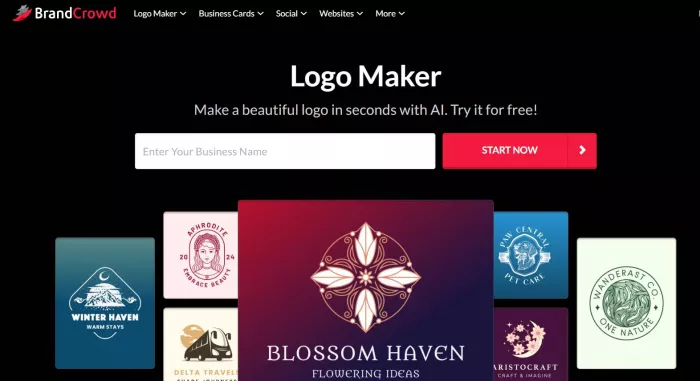
The tool is easy to use even if you haven’t used any editing software or AI tools before. Simply follow these steps:
- Go to https://www.brandcrowd.com/ai-logo-generator.
- Type in your business name. You can also add optional keywords for more tailored results.
- Browse the results. You can add or change keywords or add filters to refine your results.
- Select the design you like.
- You will then be taken to the editor. You can change everything from the color to the icon to the text.
- You can also add extra elements like curved text, animation, or gradients.
- Click Download to use.
Key Features of BrandCrowd AI Logo Generator
What makes the BrandCrowd stand out from other logo maker tools? Some notable features are:
- Smart AI generation - BrandCrowd’s AI studies your brand name, keywords, and industry to generate logos that are suitable and on-brand. It also follows rules of graphic design so the final logo looks balanced and visually appealing. You won’t get any random logos that feel irrelevant or just some vague mishmash of elements, which usually happens with AI tools.
- Advanced AI editing - Users can edit via AI chat rather than manually making edits. You can instruct the AI to change the icons, text, and so on. The AI will also suggest relevant changes to further solidify your design.
- Thousands of logos to choose from - BrandCrowd’s AI logo generator can come up with thousands of designs in just one prompt, unlike other tools that can only produce a few to a dozen.
- Variety of designs - BrandCrowd’s logo variety is also top-notch, as you can choose between multiple styles like minimalist, modern, retro, corporate, whimsical, 3D, mascot, or more.
- Endless generation - BrandCrowd allows users to generate logos endlessly without limits unlike other tools. This makes it easier to experiment with your logos or browse multiple styles before committing to a final look.
- Intuitive editor - The platform uses a simple drag-and-drop editor, which is perfect for beginners who don’t want to deal with technical controls and settings.
- Exclusive elements - BrandCrowd offers an extensive library of exclusive fonts and shapes, which can be used to beautify your logo designs. Since these are also exclusive, it means your output is unique and can’t be replicated with other logo maker tools.
- Commercially safe designs - All logos in the platform are checked for commercial safety, originality, and quality to ensure users only get the best of the best.
BrandCrowd Files and Export Options
BrandCrowd’s logo export includes a full range of formats for both digital and print use:
- Vector: SVG, EPS, PDF
- Raster: PNG, JPG
- Animated: GIF & MP4
- Icon-only & transparent background options
Most competitors only give simple PNG or JPG, so BrandCrowd’s vector and animated support is a strong edge.
BrandCrowd Collaboration and Workflow Features
BrandCrowd also adds features typically missing from AI logo makers:
- Save favorites to shortlist, which can help compare logos side by side
- Create voting polls to gather feedback from friends or team members
- 24/7 email support
- Live chat support
These additions make it practical for collaborative branding decisions rather than purely solo use.
BrandCrowd Multilingual and Multicurrency Support
The platform supports 7 languages (as of February 2026):
- English
- Spanish
- French
- German
- Portuguese
- Canadian French
- Brazilian Portuguese
And currently supports 9 currencies:
- USD
- AUD
- GBP
- EUR
- INR
- PHP
- BRL
- MXN
- ZAR
For international users, this makes the platform easier to use and navigate.
BrandCrowd Additional Tools
BrandCrowd is more than just logo creation. You can also use the platform to build materials such as:
- Websites
- Business cards (both physical and digital)
- Social posts, videos, and ads (Instagram, Facebook, etc.)
- Email Signature
- Presentation
- QR codes
- Menus
- Letterheads
- Animation
- Flyers
- Posters
- and more
BrandCrowd also offers a Brand Kit creator, where after you create a logo on the platform, other designs you do will automatically inherit your logo’s styling. This helps you easily create consistent and cohesive brand visuals.
BrandCrowd also offers business name generators and domain name generators to help you build your brand.
There are also printing services with free delivery–practical if you want physical materials or merch without logistics hassles. Pricing for the printing will depend on the quantity, materials, and other specifications.
BrandCrowd Pricing Breakdown 2026
Here is the pricing breakdown for the tool:
| Plan | Monthly | Annual | What’s Included |
| Free | $0/month | $0/month | Free logo |
| Starter | $9/month | $3/month | Premium Logo Pack only |
| Value | $14/month | $4/month | Premium Logo Pack + Website |
| Premium | $19/month | $5/month | Premium Logo Pack + Website + More features |
Pricing above is verified in the BrandCrowd website and is the current pricing as of February 2026.
BrandCrowd offers both Free and Premium logos. You can see which is which by checking the upper right corner as they are tagged accordingly.
Free logos can be downloaded for free with no watermarks or any hidden charges. Premium logos require subscription before you can download them.
Here is what’s included in all paid plans:
- Your logo is yours forever
- Cancel anytime
- High-res and vector logo files
- Unlimited changes to your logo
- Business cards
- Instagram posts
- Facebook posts
- Email signature
- Letterheads
- 50+ other design tools
- 591,000+ templates
Value pack adds a Website, while Premium pack adds Website + Link in bio + Digital business cards.
Annual plans also show a considerable 72% of savings, which is a more cost-efficient option.
Final Verdict
BrandCrowd’s AI Logo Generator strikes a strong balance between scale, speed, and quality. Its biggest strength is how easy it makes getting beautiful and premium logos even without any editing expertise.
We also commend the quality of the AI itself. The generated logos all look relevant, on-brand, and visually appealing. It looks custom-made rather than just another template or robotic output, which is usually the case with AI logos.
If you’re launching a business and want to quickly take your brand from idea to visual assets without steep costs or learning curves, BrandCrowd is one of the most practical and reliable AI logo maker tools in 2026.

Comments