99math Review 2026: Free Multiplayer Math Game for Classrooms (Setup Guide + Safety Check)

Rajat Chauhan
99math is a free, browser-based multiplayer math game designed to make fact practice feel like a live competition instead of a worksheet. Teachers host a game, students join with a code, and everyone races to answer math problems in real time.
With more teachers switching from dull drills to gamified tools, the key questions are: Is 99math actually good for learning? Is it safe for kids? And how does it compare to Blooket or Kahoot?
This review breaks down how 99math works, what it does well (and not so well), how to set it up in your classroom, and whether it deserves a regular slot in your math block.
Quick Verdict: Is 99math Worth Using?
Mostly yes. 99math is a legitimate, free tool for building math fact fluency and boosting engagement in K–6 classrooms. It does not require student accounts, collects minimal data, and is straightforward for teachers to run.
| Metric | Rating | Details |
|---|---|---|
| Cost | ✅ Free | 100% free for teachers and students |
| Setup | ✅ Easy | Create a game in 1–2 minutes, share a join code |
| Student Privacy | ✅ Safe | No student accounts required; use nicknames |
| Engagement | ✅ High | Fast-paced multiplayer races keep kids focused |
| Content Depth | 🟡 Limited | Excellent for fact drills, not a full curriculum |
| Best For | 🟢 Good | K–6 fact fluency, warm-ups, exit tickets, quick reviews |
Bottom line: A great supplement for math fact practice and classroom engagement. Use it for short, focused sessions—not as your entire math program.
What Is 99math?
99math is a free, web-based multiplayer math game focused on speed and accuracy with basic operations. Instead of static worksheets, students compete in real time to answer as many correct questions as possible while a live leaderboard updates on the screen. It is built for K–6 classrooms and can also be used for homework, centers, and remote learning.
In 99math, teachers:
- Choose a topic (e.g., single-digit addition, two-digit multiplication, division).
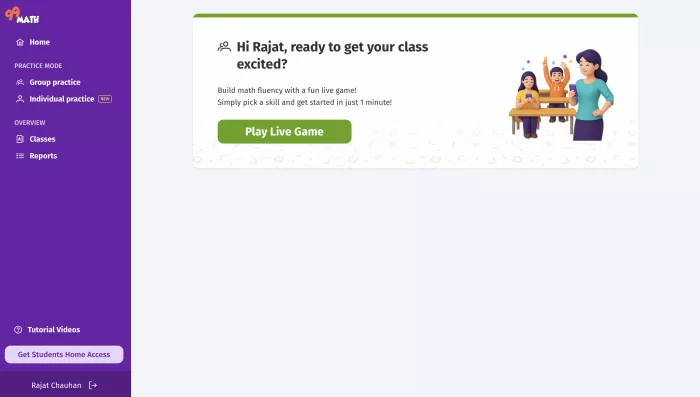
- Host a live game from their teacher dashboard.
- Share a game code with students.
- Watch live performance and review results afterward.
Students:
- Go to the 99math website.
- Enter the teacher’s code and pick a nickname.
- Answer timed math problems on their own device.
- See their score and rank at the end of each round.
It is primarily a fact fluency tool, not a deep conceptual learning environment. The focus is on getting faster and more accurate with basic operations.
| Feature Category | What It Does |
|---|---|
| Live Multiplayer | Runs timed math challenges with a live scoreboard. |
| Skill Selection | Lets teachers choose operations and difficulty by grade level. |
| No-Account Join | Students join with a game code and nickname only. |
| Teacher Analytics | Shows correct/incorrect answers and speed for each student. |
| Team & Solo Modes | Supports individual or team competitions. |
| Remote-Friendly | Works in a browser, can be used over Zoom/Meet. |
How 99math Works (The Technical Walkthrough)
To understand the real setup effort and classroom workflow, here is what running 99math looks like from a teacher’s perspective.
1. Sign-Up (Free Teacher Account)
- Go to the 99math homepage.
- Teachers can sign up with email or use single sign‑on options like Clever or Google, depending on their school setup.
- Create a free account using an email and password.
- Confirm your email if prompted.
Critically, students never need to create accounts for basic play. The teacher’s account is used only to create games and view results.
2. Creating and Hosting a Game
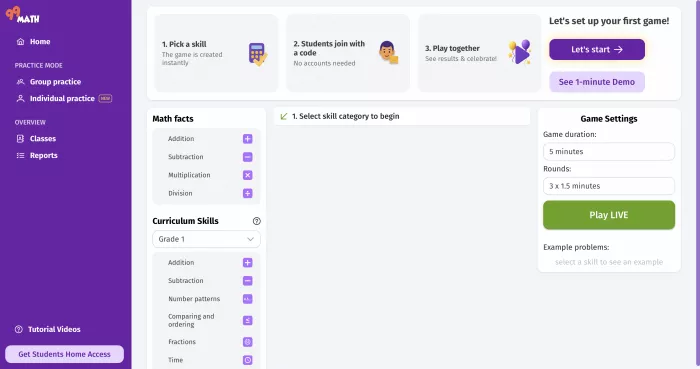
- Once logged in, the teacher dashboard lets you create a game in a few clicks.
- From the dashboard, click “New Game”.
- Select the grade level or skill band (e.g., Grade 2, Grade 5).
- Choose a topic (Addition, Multiplication facts, Division, Mixed review).
- Choose a game mode (Individual or Team).
- Set the time limit or number of rounds.
- Click “Start game”. The platform will generate a Game Code.
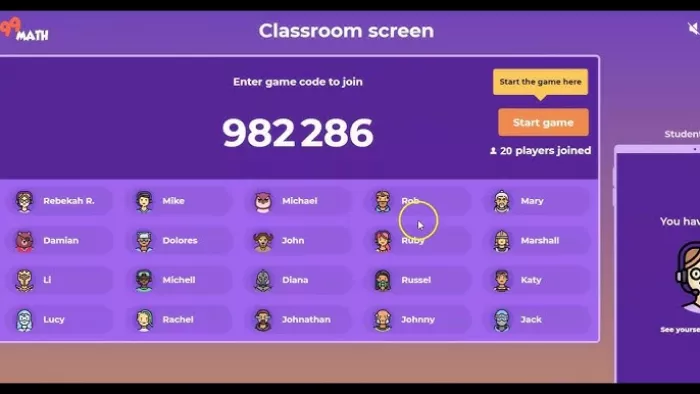
3. Student Join Flow
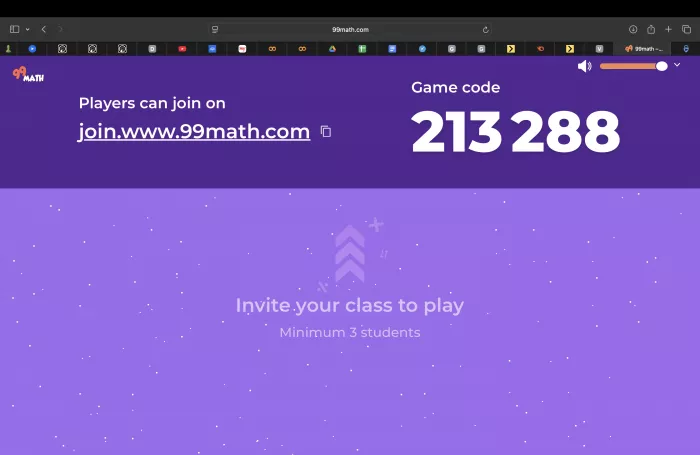
Students join from any device with a browser:
- Open 99math.com/join.
- Enter the Game Code displayed by the teacher.
- Type a Nickname (real name or alias).
- Wait in the lobby until the teacher starts the game.
4. After the Game
At the end of a session:
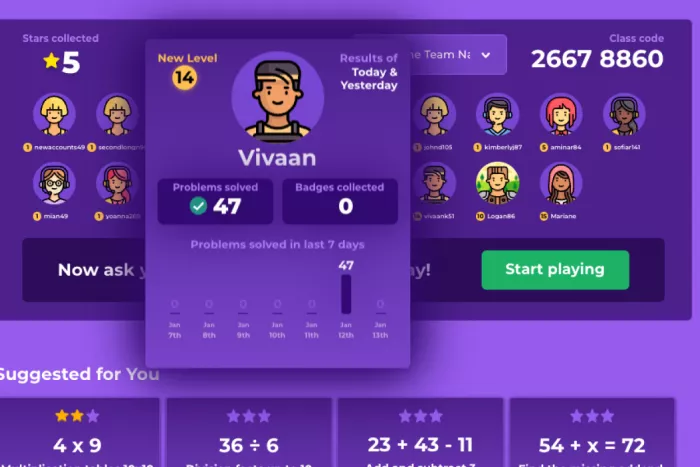
- Students see their total points, accuracy, and rank.
- Teachers see a summary with missed questions, student accuracy, and class-wide performance.
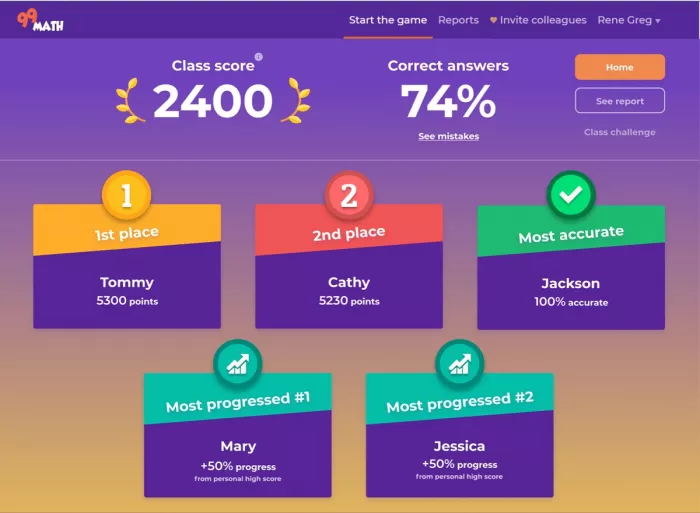
- This data is crucial for identifying which students need more practice on specific facts.
Key Features in Detail
1. Live Multiplayer Math Battles
The core game loop is designed to transform simple fact drills into a competitive experience. Because all students play at the same time with real-time feedback, it increases focus and reduces idle time. It works well as:
- A 5–10 minute warm-up at the start of class.
- A quick review at the end of a lesson.
- A mid-week fluency check.
2. Customizable Skills and Difficulty
Teachers can choose exactly what skills students practice:
- Single-digit addition and subtraction for younger grades.
- Multiplication and division facts for upper elementary.
- More complex operations for older students.
- Because the teacher controls the topic and difficulty, 99math adapts to diverse classrooms and can be used across grades.
3. No Student Accounts Required
In its simplest mode, 99math does not require students to register or log in. They join via code and nickname. This reduces:
- Time lost to login issues.
- The amount of personal data collected.
- Potential friction when teaching multiple classes.
- Teachers who want long-term tracking can optionally set up more structured student access, but the basic use case is anonymous.
4. Real-Time Teacher Analytics
During and after a game, the teacher dashboard surfaces:
- Accuracy by student.
- Types of questions students struggled with.
- Class-wide fluency on the chosen skill.
- These analytics are not as deep as a full adaptive learning platform, but they are more than enough to guide small-group instruction or decide which facts to reteach.
Flexible Modes and Environments
99math works across:
- In-person classes (display code on projector, students join on their devices).
- Remote learning (teacher shares code via Zoom/Meet chat).
- Centers or stations (smaller groups playing separate games).
- Because it is browser-based, it works on Chromebooks, PCs, tablets, and many phones.
Safety, Privacy & Student Data
Is 99math Safe for Kids?
For most use cases, yes. It is designed to minimize student data collection:
- Students can play without creating accounts.
- The only data needed is a game code and nickname.
- No student email or personal information is required for basic play.
COPPA & Privacy Considerations
Because 99math can be used without student accounts, it generally avoids collecting personally identifiable information (PII) in its most common scenario.
Best Practices for Safe Use:
- Instruct students to use First Names only or nicknames.
- Avoid entering student emails unless your school explicitly allows it.
- Review 99math’s privacy policy if you plan to track long-term data.
Pros & Cons (Honest Review)
| Strengths | Limitations |
|---|---|
| ✅ Completely Free: No paywalls for core features. | ❌ Drill Focus: Teaches speed, not concepts. |
| ✅ Low Friction: Setup takes <2 minutes. | ❌ High Pressure: Timers can cause anxiety for some. |
| ✅ High Engagement: Kids love the competition. | ❌ Limited Variety: Fewer modes than Blooket. |
| ✅ Flexible: Works in-person or remote. | ❌ Online Only: Requires stable internet. |
Who It’s Best For:
- Teachers needing quick, no-cost math fact practice.
- Students who respond well to gamification.
- Classrooms with limited budgets but access to devices.
99math vs. Other Classroom Games
How does it compare to the giants like Blooket and Kahoot?
| Aspect | 99math | Blooket | Kahoot | Prodigy |
|---|---|---|---|---|
| Main Focus | Math facts (speed) | Multi-subject review | Quizzes | Math RPG |
| Cost | Free | Free + Paid | Free + Paid | Free (optional paid) |
| Student Accounts | Optional | Optional | Optional | Required |
| Game Variety | Simple races | Many modes | Quiz format | Story quests |
| Setup Speed | Very Fast | Fast | Fast | Slow |
The Verdict: Use 99math for pure math fluency. Use Blooket or Kahoot if you need variety or other subjects.
FAQ (Common Questions)
1. Is 99math completely free?
Yes. The core platform is free for teachers and students, with no subscription required for normal classroom use.
2. Do students need to sign up?
No. They can join with a game code and nickname. Accounts are optional.
3. What grades is 99math best for?
Primarily K–6, though it can be used in higher grades for fluency refreshers.
4. Can I use 99math for homework?
Yes. You can share a game code and let students play asynchronously, though it is most fun live.
5. Does it replace traditional math teaching?
No. It is a practice tool, not a curriculum. Use it to reinforce what you have already taught.
Final Verdict: Should You Use 99math?
Rating: 4.5/5 — Excellent for math fact practice.
Use 99math if:
- You want a fast, free way to practice math facts.
- Your students love competition.
- You want a tool that doesn't require student logins.
Skip it if:
- Your students struggle with math anxiety (timers can be stressful).
- You need to teach concepts, not just speed.
My perspective: 99math is a great tool for building math fact fluency. The barrier to entry is zero, and the engagement is high. Just remember to frame it as practice, not a test!

Comments